Open-source software is too valuable to ignore, according to librarian and software developer Dan Chudnov, who likens it to the gift of Carnegie libraries a century ago.
Explaining that you can no more run a library without software today than you could run a library without a building in 1900, he says open-source software is “as massive a donation of time, energy, and products you cannot afford to turn down today as Carnegie-built libraries were back then.”1
But libraries, thanks to Gates Foundation grants and a variety of state and federal programs, have been given lots of technology over the past decade. Consultant Robert Williams's story of technology funding in Texas is familiar to many.
The State of Texas passed legislation in 1995 providing grant funds for public libraries and schools for implementing technology (LARGE funding). So every small library in Texas was able to gain state-of-the-art technology, especially for public access. Unfortunately, that legislation was not extended, and funding effectively ended in 2003.2
That's when Williams and others in the Texas regional library systems began to focus on the sustainability of their technology. Williams founded the Low Cost, Low Maintenance Technology Project to support those efforts, and the group had just begun to look seriously at open-source solutions when Microsoft donated software licenses to the libraries. Comparing Microsoft products against OSS based only on acquisition cost, many libraries chose to implement Windows-based terminals “because that's what ‘everyone' has, wants, and can find help for,” according to Williams.3
But Williams also worries that the Microsoft's generosity, like the Texas technology grants, won't last forever, leaving libraries again stranded with technology investments they can't sustain. Citing not just the cost of maintaining the technology, but also the training investments libraries make, Williams points to open source as “the only viable solution” over the long term, a solution from which “schools and a lot of community organizations and individuals will benefit.”4
Low Cost, Low Maintenance Technology Project http://lclmt.com
Truly “free” software—GNU General Public Licensed open-source software—doesn't evaporate when the money dries up. But, as Williams discovered, making the leap to OSS can be difficult for some. And yet, for many others, it can be quite easy.
John Brice, executive director of the Meadville Public Library, Meadville, Pa., and system administrator for the Crawford County Federated Library System, Crawford County, Pa., started small in the late 1990s, but found OSS a good fit. “As we became more comfortable rolling our own systems we developed the confidence to tackle more and more difficult tasks.”5
Aaron Schmidt, with Thomas Ford Memorial Library at the time, began working with OSS because it was free and easy.
In 2005, the Thomas Ford Memorial Library and Western Springs Historical Society began work on digitizing their collection of photos of the community of Western Springs, Illinois. The scanning was done in-house, using a “fancy new copy machine/printer/scanner” the library had leased. Aaron Schmidt had assembled the components to deliver archival TIFF images from the photos, as well as a workflow in Adobe Photoshop to make Web-ready files from those large TIFFs, but the library had no tools to put those images online.6
Schmidt immediately thought of using WordPress, an open-source content management application, to display the photos. “WordPress was the obvious choice,” in part because “it is free (in both senses),” and because it was an open-source application, he “figured people had already solved many of the issues I would face.”7
The result, online now, represented each of the homes of the community on its own page—one page per street address—and included all the info the historical society had about the address, as well as a form for comments.
Western Springs History www.westernspringshistory.org
“Western Springs is an active community, and I know that people would have content to add. I knew they'd have more details than we had in the historical society files,” explained Schmidt on the importance of the comments.8
The database-driven architecture also made it easy to search and explore the site, and because WordPress content is easily browse-able, Google and other search engines can index the content, making it available to users there.
But among the top reasons Schmidt cited for using WordPress was how easy it was to manage. “I didn't have time to do all of the work,” he admits, so finding an application that others could quickly learn and use was important. WordPress delivered that ease of use, both to public users and to library and historical society staff posting new content. “‘Email things to the web,' was how I'd describe it,” according to Schmidt.9
And going from idea to solution was easy too: “All it took was getting the domain and hosting, and I was able to start creating the pages.” Schmidt didn't need to get approval before starting work, and once it was running, the administration quickly grew to like the site for the way it strengthened the partnership with the historical society and offered new, interactive services to the community.10
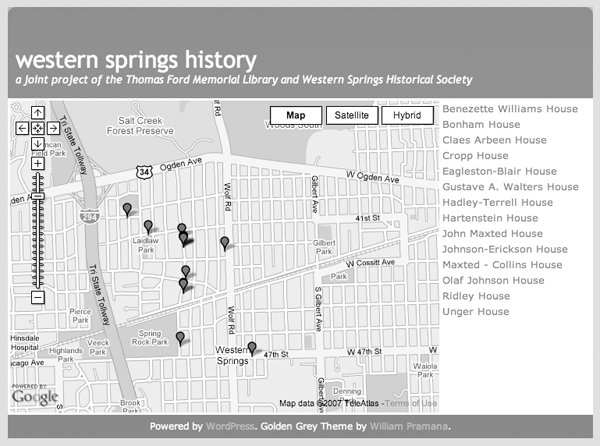
Schmidt also liked the opportunity to experiment. He had originally given the site a custom design, but “grew tired of it,” and later implemented the current theme after he found it among those available as open source. He also built a map, allowing users to see and explore the houses and streets visually (see figure 2). “Right after this site launched the Google maps API came out and it seemed like a natural fit. So I spent an afternoon figuring out how to best utilize it, and came up with this.” Emphasizing how easy it was to connect the data in the WordPress site to Google's maps, he notes “that's part of the magic of APIs, it's just a matter of connecting the right pieces.”11
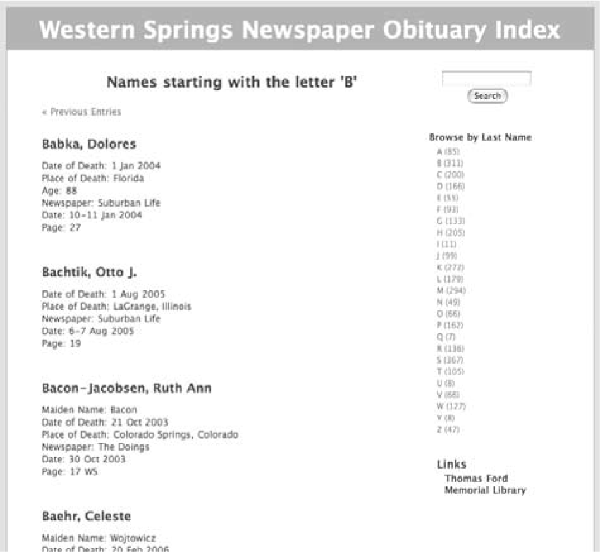
With the success of the first site, Schmidt began work on a new site cataloging obituaries in the two local papers (see figure 3). This site, also built on WordPress, leverages the application's searching and browsing features to make it easy for users to explore the 3,100 entries input so far (early 2007).
Western Springs Newspaper Obituary Index http://fordlibrary.org/obits
Schmidt's a bit shy to admit that he's also happy about how the two sites draw considerable Internet traffic to the library, a sign of the success the library is having in making the information available.
And the community responded with appreciation.
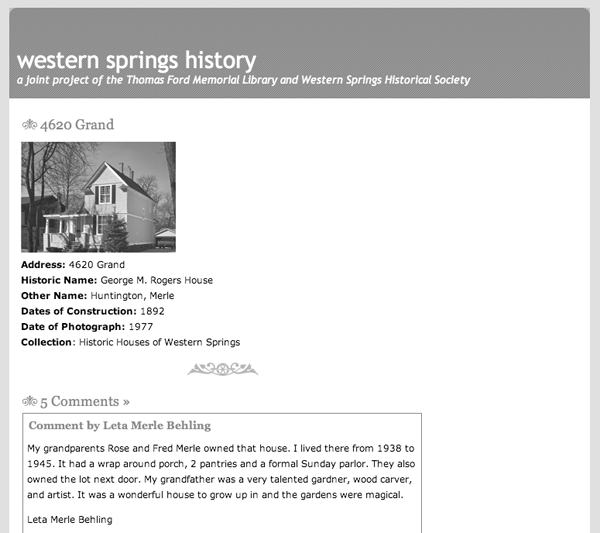
“We were able to give people in the community a voice,” Schmidt says, pointing to some of the houses in the Western Springs History site and the conversations that have sprung up in the comments there (see figure 4).12 In one comment, a patron began, “My grandparents Rose and Fred Merle owned that house … ,” while other patrons responded with their memories of the place.13
And in March 2006, a resident sent in his own history of the town for publication on the site, garnering even more comments and history from the community. One former resident discovered the site and offered this:
I just ran into this site, and it was very interesting. Although I know a different Western Springs (I lived there from 1992 as a newlywed at 4724 Lawn to 2003 and am now in Hinsdale), I could almost see the town as you have described it. It sounds like a simpler place in a much simpler time, and you have answered many questions I had about what used to be where.14
Though Schmidt has since moved on from the library, the projects are continuing without him. “Someone with Web skills needed to be around to install WP and get the site going, but it is easily maintained.” When the site was first launched, “we spent maybe two hours per week approving comments and making sure things were working,” and now that the staff is up to speed on how it works, they spend less time maintaining it.15
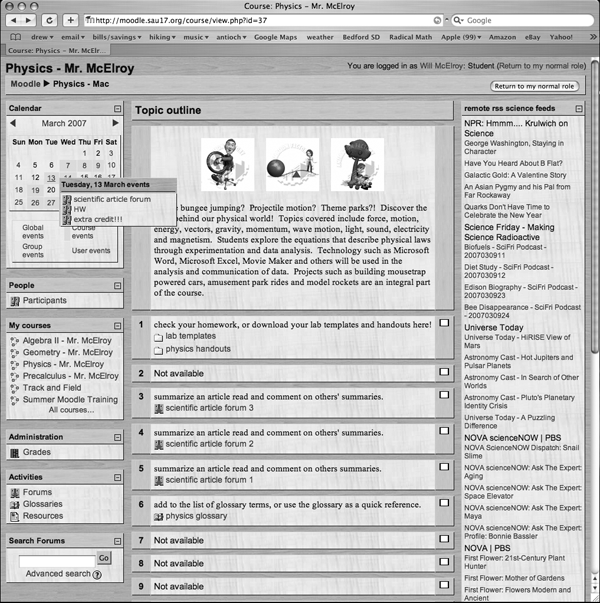
Maureen Sheehan, technology integrator for Sanborn Regional Schools in southeastern New Hampshire, also found it easy to get started with open source. The school system is using Moodle, an open-source learning management system, or LMS, that helps teachers deliver instructional content online, as well as offer online class discussions, tests, and quizzes and allow students to submit homework assignments online (see figure 5).
Sheehan says she started looking at the software when a teacher who was familiar with it from another school system requested it. Sanborn didn't have an LMS, so she mentioned it to the network administrator, who was able to get Moodle up and running in a day. “And he was able to get all the students imported, so they could use it quickly.”16
With the project now in its second year, Sheehan says “I love it, it's wonderful for our district,” adding that it's “very convenient. It's improved communication with our students.” She offers the story of a math teacher who posts all his homework assignments for all his classes in Moodle, “so students and parents can always see what's been assigned, and download the worksheets,” as well as the story of an English teacher who asks students to continue in-class discussions of their reading online in Moodle.17
Moodle http://moodle.org
Noting an upcoming requirement from the state that students maintain portfolios of their work, Sheehan says the district is planning to use Moodle as an “e-portfolio system.” The school system's earlier leap to open source, as it turns out, has positioned it well for the new requirements and will save it from having to buy a commercial product.18
And the price was one of the biggest selling points. “The fact that it was free gave me more confidence,” says Sheehan, who notes that so far the only costs have been for time spent training the teachers.19
But not everybody is so quick to leap into open source, and even a number who do may need some support along the way. LibLime's Joshua Ferraro is familiar with that need. Ferraro established LibLime in 2005 based on his experience as systems administrator at Nelsonville Public Library, Ohio, where he led the library's move to an open-source ILS from 2001 to 2003.
Today, the company supports Koha and Evergreen, two open-source ILSs, offering support for self-managed solutions, as well as turnkey and hosted solutions. Koha support is available for two versions, Koha Classic (based on Koha 2.2), Koha ZOOM (based on Koha 3.0).
Working with public, academic, and special libraries, Ferraro says he “can't really identify a single type of library that's more ready than any other” for open source.
Because our products are so flexible, we've developed several profiles that meet the specialized needs of each library type. In this way, all can take advantage of the core system while maintaining individuality.20
The company happily responds to “OSS friendly RFPs,” though a growing number of libraries are forgoing the RFP process and contracting for short-term service.
One of the advantages of OSS is that part of the deal is “no vendor lock-in.” So if LibLime isn't offering the best services to our customers, they have the opportunity to look elsewhere for support.
With a proprietary product, support services (customization, feature development, and often even maintenance and tech support) can only be obtained from one vendor; with OSS, anyone can provide the service.21
Ferraro also points to the strength of the open-source community as a feature of their offerings, explaining that Koha's success is based largely on the number of libraries that have embraced it and are supporting its development. But comparing OSS to proprietary software, he explains that the risk with OSS is lower because when a “vendor's marketing efforts fail, the product is orphaned,” but with OSS the library can continue on its own, even “hiring a programmer to maintain it.”22
Though Ferraro likes to point out how easy it is to migrate to or from OSS, he's also proud to point to his company's growth. LibLime recently aquired the original developers of Koha and has “seen a recent surge in the number of libraries looking to move to open systems.” And the company offers a full range of services to make the move easier, including support, hosting, turnkey solutions; data migration, extraction, import, and verification; and training. “At the end of the day, I'd say our strongest quality of service point is the time we take to understand each client's needs, and effort we put into helping them improve their workflow, reduce cost, and realize their technology goals.”23
Speaking on the real value of OSS to libraries, Ferraro notes:
[The] difference with OSS is that the software is ultimately free. You don't pay someone to license it to you. What you pay for is the service of creating, and of delivering it. The long term effect is that the overall cost is reduced, because the creation process is only paid for once. Additionally, it typically results in a purely services-based support model, which means competition forms around the best value added services, rather than around the software itself.24
In Detail: Meadville's Embrace of Open Source
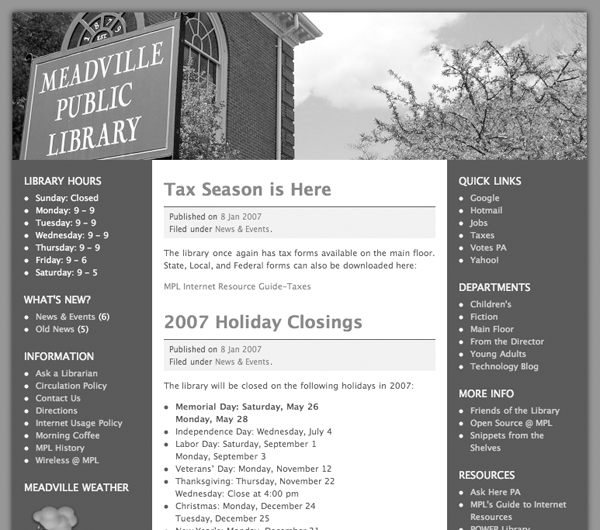
John Brice, executive director of the Meadville (Pa.) Public Library (see figure 6) and system administrator for the Crawford County (Pa.) Federated Library System, and Cindy Murdock, network administrator for Meadville Public Library and Crawford County Federated Library System, have been strong advocates of OSS since they began experimenting with it in the late 1990s. The pair held their first OSS conference in late 2001, and have been regular presenters at conferences since.
Both answered questions about Meadville's use of OSS.25
- Q: When did you get started with open source?
- Murdock: We first got involved with OSS about eight years ago. I'd always had a knack for working with computers but very little formal or Unix experience, so John hired a retired meteorology professor who had been working with OSS as a hobby to show me the basics. We worked together on a number of our early projects—replacing our NT-based Web and e-mail server with one running Linux, reusing old computers as routers sharing dialup connections at our smaller libraries, and learning to use squidGuard for Internet filtering. My first “solo” OSS-based project was putting together our first LTSP [Linux terminal server project] server for public Internet stations back in 2000.
Meadville Public Library http://meadvillelibrary.org
- Brice: Back around 1999 we needed a router/firewall for our seven rural libraries, we did not have a budget to use a closed source solution. One of my rural librarians was married to a retired college professor who had been using Linux for about five years to run his home weather station. He suggested we could do the whole project for less than the cost of one new computer. We purchased ten old Compaq 486's for $20 each, ripped out the hard drives, installed some network cards and modems and had the whole thing boot up off the floppy drive. The computers worked well for about three or four years, when we slowly replaced them with [newer systems] when the libraries upgraded to broadband connections.
- Q: How is OSS serving the library?
- Murdock: OSS is serving us in quite a lot of ways. We use a wide variety of open source operating systems, not just Linux but also OpenBSD and FreeBSD. We try to avoid commercial products whenever possible, not only to save licensing costs but also to give us more extensive control over our computing environment.
- County-wide, we're using open source tools for our Web sites (Apache, WordPress, the Scout Portal Toolkit, etc.), e-mail (qmail, squirrelmail, SpamAssassin), Internet firewalling, proxying, and filtering (OpenBSD's pf, squid, squidGuard, and DansGuardian). At Meadville we're using thin clients based on the LTSP for public Internet access. Soon we'll be using them in several of our other libraries as well. We also have a few stand-alone Linux workstations for both staff and the public, and where we do still use Windows, we utilize OSS tools such as Firefox, Thunderbird, and OpenOffice.
- Our biggest project to date is migrating our libraries to the Koha ILS; we should be migrating Meadville in early April with our other eight libraries to follow soon thereafter. Once we migrate to Koha we will be able to convert a number of our older computers into thin clients, since we will no longer need a Windows environment for circulation and public catalogs.
- Brice: Well, we have a LAMP server so we run e-mail, Web hosting, etc. off OSS. All of the servers are backed up each night using software from the University of Maryland called Amanda. I personally use Linux on my desktop and so does the IT staff. In the next year we will slowly move the other staff computers to open source apps. We have an OSS wireless router running in all nine of our libraries. We have developed our own filtering solution using OSS programs. We have a Web kiosk design that is based on thin client OSS technology (Cindy developed that solution too). We have an OSS firewall, a special program that can generate magazine barcodes and MARC records (our librarians really like that program). The big news though is that we are planning to migrate to Koha circulation system sometime in the next month or so.
- Q: What were the landmarks along the way?
- Brice: We do one project at a time and we try to finish one project before we begin another. It usually takes between six months to a year to research, prototype, acquire appropriate hardware, beta test, debug and get into production a completed system. This not a hard and fast rule. Some projects like the backup server took just a few weeks while the Web- based Kiosk system took almost a year.
- Q: Tell me more about the switch to Koha.
- Brice: Well, you can write a book about using Koha. We have been looking at Koha for about four years now. We actually preferred another possible OS circ system called OpenBook but that became vaporware. We originally did not like Koha because it did not use MARC, but Nelsonville, Ohio, paid to add MARC in 2002. When we visited Nelsonville in 2002 we became concerned about the system speed. Nelsonville was about 75 percent the size of our system and Nelsonville speed was just barely acceptable.
- Koha had what is a common problem called scalability. What worked fine for a library with 50,000 books would not work for a library system with 300,000. After we evaluated commercial software in 2005 we decided to go the open source route and selected Koha. However, before implementing it we hired LibLime to create a version of Koha that used different indexing technology to significantly increase the speed of the transactions. The new index software became operational at the beginning of 2007 and we are just about ready to begin transitioning libraries from our current circ system (Winnebago) to Koha.
- Q: The thin clients are a huge step for many libraries. How'd it work out in Meadville?
- Murdock: It's working out rather well. I replace the server about every two years, but I'm still using our original thin clients from eight years ago. Presently we have nine thin clients for public Internet access, but once we switch to Koha I'll be adding twelve more for circulation and public catalogs. They're very low maintenance; once the server is configured I rarely have to do anything to it, and there are no worries about viruses, spyware, and other such annoyances.
- Q: The library Web site runs on WordPress. How was that decision made, and when?
- Murdock: I made the decision to use WordPress. If I recall, I began converting our libraries' Web sites (not just Meadville's, but the main site for the county library system, http://ccfls.org, and each of the other libraries) to WordPress.
- We had been using static Web pages, and I was the only person who knew how to edit them, so it was rather time consuming to keep information up to date. By switching to WordPress our librarians could create their own Web content without having to know HTML, and it freed my time for other pursuits.
- Most of our librarians have taken to managing their content rather well. I can't say that I've had any regrets; I've been pretty happy with the decision to use WordPress. Our on-staff programmer has even created a plugin for it so the librarians can update their library hours without my help.
Crawford County Federated Library System http://ccfls.org
- Q: It sounds like you've become very comfortable with OSS. How so? Do you view the risks differently?
- Brice: We build upon success. We view our Open Source Projects as building infrastructure. We started by implementing small projects that were not necessarily mission critical. As we became more comfortable rolling our own systems we developed the confidence (some would say cockiness) to tackle more and more difficult tasks.
- Q: You've both made a number of presentations, and I've seen a number of messages from you on mail lists. Are you more comfortable doing that with the knowledge that you're not promoting a commercial product?
- Murdock: Yes, I am more comfortable with that. We've gained so much from using OSS that we want to give something back, and getting the word out by doing presentations and helping others on mailing lists are two ways we can do that.
- Q: A common criticism of OSS is that there's no company supporting it. What's your take on that?
- Brice: Well let's look at how a commercial company supports their software. Usually a software company has a special department of individuals who answer questions. They base their answers, usually, on a database of questions that was developed by the programmers and on previous answered questions. If you have a new problem or a bug then that problem usually has to go through customer service department over to the programming department where the programmers may get to it when they don't have anything else to do.
- With open source we make sure that the program we use has an active community with FAQ list that is updated on a regular basis. Most problems you will have can be answered through the public FAQ lists. If you have an uncommon problem or a bug, you usually can contact the person who wrote the program or someone who is currently writing code for the next upgrade. In most cases the problem can be fixed through an e-mail or two.
- In our experiences we have found OS software to be more reliable and we receive faster support than commercial. However, you have to realize that you need a staff member who understands Linux or Unix command line commands and the file directory structure. This is a skill that can be learned (we hired someone to teach us) but it does have to be in house in order to develop, and support Linux based solutions in the library.
- Q: Do you feel the larger community of people using OSS makes time spent supporting it more productive vs. proprietary software?
- Murdock: Yeah, that is certainly true. And far less frustrating!!!
- Q: What about sustainability? Buying a commercial product offers a veneer of support and long-term commitment, but what if that company's market dries up?
- Murdock: We've had exactly that happen. Also, what happens when a company drops support for the version of software you're using, but you're happy with the version you're using and don't want to pay for the upgrade? At least with OSS, there is at least the prospect of someone else taking over or forking the project if the original developers don't want to carry on.
- Q: With the exception of Koha, none of the software you're using is specific to libraries. That increases the size of the software's user community, but also brings in people with different goals. Any thoughts?
- Murdock: Yes, that's true. There have been times I've had to spend a lot of time researching how to do something I wanted to do because there were few others out there that had done or wanted to do the same thing. For example, locking down the desktop environment for the LTSP terminals. On our first installation of it in 2000, very few had done so (or perhaps had bothered to document it), so I spent a lot of time figuring out how to configure the environment.
- Q: What happens if you leave?
- Murdock: I'm not planning on doing so anytime soon. :) Good question, though. We do have another person in our IT department, so at least I'm not the only one who is familiar with our systems. If I were to leave I would certainly have to show the ropes to my successor (I think that would be the case with any such transition, whether we used more proprietary software or not), but since OSS is by nature open, and most of the OSS that we use is fairly standard, it would not be too difficult to find someone else that was well-versed in OSS tools and would be able to take over. Nobody's irreplaceable. ;)
- Q: You say you've been stuck with proprietary software that the vendor no longer supported before. Can you say more?
- Murdock: The circulation system we're migrating from is Winnebago Circ/Cat, a DOS-based circ system. While it's been quite the workhorse over the years, I don't believe that Winnebago (now Sagebrush) is supporting it at all. We tried migrating to a newer Sagebrush product, but were dissatisfied with it and wound up staying with Circ/Cat. That's one reason we chose Koha, so that we wouldn't be at the mercy of vendor lock-in. Another example is a Web-based catalog we purchased from them several years ago to serve up our collection on the Internet. It kept losing track of our database, and the company was unable to get it to work for us.
- Q: How is the decision-making and approval process different for projects that use OSS compared to proprietary software?
- Brice: We actually look at commercial software, in most cases, before we decide to use open source (why reinvent the wheel). In most cases we balk at commercial because it does not work the way we want it to work. In other words we do not want to have to alter our work practices to fit software needs, we want to alter software to fit our practices. We look at price, in most cases we save a little by going open source though we usually reinvest the difference in purchasing really good and reliable hardware. By the time you invest in staff development time, purchasing of first class hardware and other incidentals costs you usually pretty close to the cost of a commercial software solution. Where we save big, however, is in the ongoing costs. When completed the solution belongs to us, we know it, we support it, and we can upgrade when we want to upgrade and we do not have to pay another company money every year.
- Another huge advantage is reliability. Once the system is developed, the software just works and works and works without the need for constant maintenance. Most of our servers have been up and running for a year or more without any support needed by the staff.
- As for the approval process, my board is results orientated. If I can produce the same results with open source as compared to commercial and the cost difference is minimal, then my board gives me free rein. We are a nonprofit corporation so we don't have to deal with county or city purchasing department.
- Q: What about costs?
- Murdock: Right now we're mostly self-supporting. One of the best aspects of OSS is that the knowledge you gain from implementing one project can be applied elsewhere. There is considerable documentation available on the web for most projects, and support is available through forums, mailing lists, and IRC channels where you can connect with other users and usually the developers themselves.
- Due to the openness of OSS more information is available to the end user. We have purchased a year of support from LibLime, because we will be needing it as we migrate, and we want to further support the Koha project; LibLime's developers are among those that develop Koha.
- I should also mention that our county library system funded the integration of the Zebra indexing engine into Koha, so that Koha can support large library databases. OSS is not without costs, but they are different costs than proprietary software; it's like a free kitten. I think Eric Lease Morgan first came up with that analogy. The kitten may be free, but there are costs to house it, feed it, take it to the vet. With OSS you may have to hire developers to make the software suit your needs, or give your staff time (or hire extra staff) to learn it.
- I find it difficult to compare the costs of OSS vs. proprietary software; it's like hiring someone to remodel your house vs. doing it yourself. Yes, it's hard work to do it yourself, but you learn along the way, and there's also the satisfaction of doing it yourself. Actually, it's more like renting a house vs. buying one, and both have their advantages and disadvantages. If you're renting, you usually can't do much to the house; your landlord isn't likely to let you tear walls down or build additions. However, if the plumbing breaks and you're fortunate enough to have a good landlord, he'll send someone to fix it.
- If you own your house, you can do whatever you want to it, but you're responsible for either doing the work yourself or paying someone else to do it. However, you have the knowledge that the house is yours, and the freedom to do what you want to with it. So OSS is like owning the house and using commercial software is like renting.