Figures
[Figure ID: fig1] |
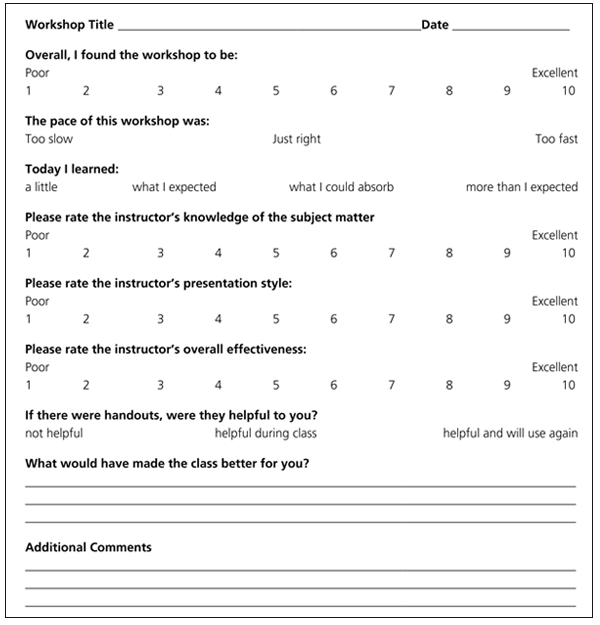
Figure 2
Sample Training Evaluation Form |
| Chapter 10: Conducting Technology Training | |
| Sarah Houghton-Jan | |
|
|
|
| Abstract |
Library Technology Reports 43:2 (Mar/Apr 2007) “Competencies are the abilities, qualities, strengths, and skills required for the success of the employee and the organization.” Sarah Houghton-Jan, the author of the second issue of Library Technology Reports in 2007, tackles technology competencies for librarians in the Information Age. “A few years ago,” she notes, “I found myself wanting a work like this to exist. Because it did not, I figured I might as well consolidate all the information about library technology competencies in one place so that others could benefit from my hunting and gathering.” In her report, Houghton-Jan provides useful technology-training practices, including:
“This work,” summarizes Houghton-Jan, “is an attempt to fill the gap in knowledge about documenting technology competencies with overall guiding principles, examples of successful projects, and project-management guidelines for those embarking upon such a project in their libraries.” About the Author Sarah Houghton-Jan received her MLIS from the University of Illinois at Urbana-Champaign and an MA in Irish Literature from Washington State University. A member of Beta Phi Mu, she has worked in libraries for a decade as a page, reference assistant, reference librarian, e-services librarian, technology trainer, and technology manager. Sarah is currently the Information and Web Services Manager for the San Mateo County Library in Northern California. She also works as a consultant technology instructor for the Infopeople Project, serves on LITA's Top Technology Trends Committee, is a member of the California Library Association's Assembly, and the past President of CLA's Information Technology Section. In her time as the IT Section President, she led the task force that developed the Association's Technology Core Competencies for Library Workers, building on her previous experience creating competencies for individual libraries. Sarah is also the author of the blog LibrarianInBlack.net. |
Just as no one is born knowing how to navigate the Internet, few of us are born knowing how to train others.
—Rachel Singer Gordon1
Technology training is not, by any measure, an easy job. Anyone who has ever tried to explain to a parent how to use the DVD player's remote will understand why. But technology training is not the big bad boogeyman it's thought to be either. Between having a technology expert who's a bad trainer or a good trainer who is technologically challenged, I'll choose the latter any day. Why? The technology can be taught. Being able to train effectively is a much more difficult skill to teach. If you are coming into this as a trainer, but not an innately talented technology guru, don't worry. If you can train on other things, you can train on technology.
Rachel Singer Gordon lists five qualities of successful Internet trainers, and I think they are equally applicable to all technology trainers:
Only one of these five traits has anything to do with technology, and note that it says “comfortable with,” not “expert in.” What's most important is that you can work well with the students and stay calm and passionate in the process.
Start on time. Simple as that. Even if some people aren't there, start on time. If you wait until everyone is there, you penalize those who did show up on time by wasting theirs, and reward those who did not by letting them know they can get away with it in the future and not miss out on anything.
Tell people the important housekeeping information immediately: introduce yourself, tell them the name of the class being taught (you'd be surprised how many people show up at the wrong class), where the bathrooms are, and when the breaks will be and check if anyone has any questions right off the bat.
At the beginning of every training session, you should explain the purpose of the training, why the students should care about what they are going to learn, what new skills they will walk away with, and why you are taking up their valuable time. Give each and every training session a sense of context. Training without context is like reading someone the last chapter of a novel and then asking them to care about the characters and plot, to understand the background intricacies. Building context does not have to be difficult. It can be as simple as having one slide in your presentation asking, “Why are we here?” Then you, as the instructor, can answer from your perspective, but don't lose the valuable opportunity to also ask your students why they are there—what do they think the purpose of the class is, how it fits into the overall goals and mission of the institution, what piece it is in the larger hole. Ask them why they came to the class, what they hope to get out of it. You will be surprised by how much you learn and how much that simple knowledge can help you shape each individual class just a bit to meet the needs of each group.
After this, do a round-robin with the attendees—ask for name and location, but also assess the learner's familiarity with the subject matter as well as what he or she expects to get out of the class. This information will not only help you tailor the class better toward the attendees, but also introduce attendees to each other and help them feel more involved and active from the very beginning of the class.
In a beginning-level class or one of the more basic classes being taught, talk openly about people's emotional reactions to computers and fear of breaking them. How many times have you heard “I'm really bad at computers”? Beginners are scared: scared of looking foolish, scared of breaking the computer. As Edward Elsner says, “Just remember, you really can't ‘break’ a computer—worst-case scenario: you have to erase everything on the computer and start fresh.”3
It is important that you as a trainer recognize the fear and identify with it as much as possible, recalling those days when you too were a computer newbie. Reassure class members that everyone is doubtful when starting to learn a new skill, that we all somehow manage to learn what we need to get by in life, and that this new skill set is no different. Emphasize that the current training is only one step and that it's not intended to teach everything all at once—in pieces will we build the whole.
There is a lot that happens in the middle of training sessions that will not be on your session outline. Questions will come up, sidetracking will occur, some students will be bored and others will be lost at the same time. No one can predict what will happen in any training session, but there are some general tips, techniques, and guidelines that, when followed, can lead to a more successful outcome for both the trainer and the students. An endless number of technology-training tips lists have been published over the last few decades. I would like to call your attention to two that I think are particularly useful, and then fill in the blanks with my own list of tips.
Michael Stephens and Rachel Singer Gordon, in their regular column for Computers in Libraries, have a particularly salient article entitled “Ten Tips for Technology Training.” Their ten tips are:
For more on each of the ten tips, check out their full article. The last tip is one that is the easiest to forget, especially as we are overwhelmed by our work and become more easily frustrated when our patience is running thin. I'm going to let you in on a little secret that I may regret letting you in on later (especially if you are ever in one of my training sessions!). Before each training session, I think back to my first day teaching anything other than “play school” with my sister and friends when I was seven—teaching freshman year English Composition to a room full of grumpy students only two years younger than I was. I remember the fear of failing, the worry about not seeming like I knew what I was talking about, but more than that, the joy that I was finally doing what I had set out to do in my career—teaching others. That pure, unadulterated joy at the prospect of teaching is something I try to recapture before every class. Try to recapture your own enjoyment of teaching too, through memories of a thankful student or a successful class. It will serve you well.
The second set of technology training tips I would like to point you to are from Brenda Hough. She lists eight tips for technology trainers with a goal of “long-term technological literacy.” For more information on each step, check out her article in full.
As alluded to in the first tip, Hough has completely stopped creating handouts with step-by-step instructions. Instead, she now uses her printed class materials only “to provide information about additional resources, to share examples of usage, and to help trainees understand the larger context.” Hough also stresses in her article that her shift in training handouts is really an indicator of her shift in training technique—“teaching concepts rather than steps.”6
As our staff members become more comfortable with the basic skills they need to access the resources and teach our users about our services, these more abstract and less explicit handouts will become the norm. I think that right now, however, we're in a middle space where some staff still need the hand-holding, while others are just waiting for that freedom-flung launch pad to learn on their own. These less explicit handouts and training techniques work well for more advanced topics, where users are already comfortable enough with their basic skills to not need as much hand-holding as newbie digital immigrants might. I still find, though, that with basic classes like Using Files and Folders, Internet Searching 101, Make Friends with the Online Catalog, and other such basic classes that the students say again and again that the step-by-step handouts are invaluable and will find a permanent place next to their workstations as reference tools. Therefore, I have no plans to abandon them completely any time soon.
Now (drum roll please) my own list of twenty technology training tips.
Not all staff members will be enthusiastic about participating in training. Most will value the opportunity to learn, but some will be resentful, even angry about being in a class. Glen E. Holt writes:
Do all staff want this training? Not all, by any means. Some library staff—including high-level managers—resist training just as they resist change generally. Like almost all training groups, librarians in training break down into “eager adopters, prove-its, and resisters.” That makes them typical rather than exceptions.7
Trainers need to be ready to deal with these reluctant learners during the class in a positive way. To that end, D. Scott Brandt suggests a few ways to deal with problem participants:
Try to learn more outside of the class. There is generally something more at work behind these loathing learners. There is almost always a story (or more than one) about why someone doesn't want to be learning whatever it is the trainer is trying to teach him or her. Finding out what that story is will often reveal the way to get the learner re-interested in learning. If you can, talk to the learner privately to try to find out what is behind his or her reluctance to learn, or to learn this particular topic. If an overall reluctance to participate in any learning initiatives is revealed, the best approach is to involve the person's supervisor at that point and work together with the employee, hopefully to a positive end.
At the end of every training session, reinforce the importance and purpose of the training. Reiterate what students should have learned during the class. D. Scott Brandt writes:
Satisfaction comes from having accomplished something worthwhile, so you should show them how the learning is worthwhile. Demonstrate what they will be able to do in the future with the new knowledge and skills. Remind them of where they started and where they have ended and ask if they are satisfied that they have learned something and can apply it.9
You should also point users to the spot on the handout that lists further resources for information on the topic and offer yourself as a resource for questions after the class is over.
Remember the importance of reinforcing over time what you are teaching—it's not enough for learners to be exposed to a particular skill once. If they are not using it regularly, the skill will be lost. Consider asking staff to set aside time to practice their new skills after the training session. You may also want to hold a formal follow-up session, especially when teaching a new procedure. Students will have had a chance to practice and may have new questions.
Ask students to fill out an evaluation of the training. The training that is provided has to be evaluated, whether the training is being provided by one training person in your library, by multiple staff members based on expertise, or by outside consultants or trainers. Have a consistent training evaluation form that participants fill out and then send to whoever is monitoring the training quality (be it a manager, a task force, or the trainer). Why is monitoring the training so important? If employees are expected to have competencies, but are not receiving training adequate to help them meet those goals, then the employees cannot be expected to achieve them. Training evaluations can cover a number of different factors: whether the topic was covered thoroughly enough, if the instructor's presentation was satisfactory, if the user feels that he or she has learned the objectives, if the user would attend a similar class in the future, depth of content, time allotted, speed of class, and what would have made the class better. Figure 2 shows a sample training evaluation.
| 1. | Rachel Singer Gordon, Teaching the Internet in Libraries (Chicago: American Library Association, 2001), 10. |
| 2. | Ibid., 13. |
| 3. | Edward J. Elsner, “The Public Library Helper,” 2005, www.mei.net/∼elsner (accessed January 12, 2007). |
| 4. | Rachel Singer Gordon and Michael Stephens, “Ten Tips for Technology Training,” Computers in Libraries 26, no. 5 (May 2006): 34–5. |
| 5. | Hough, Brenda. Teaching People to Be Savvy Travelers in a Technological WorldComputers in Libraries 2006 May;26(5):9–12. |
| 6. | Ibid. |
| 7. | Glen E. Holt, “Training, a Library Imperative” in Andy Barnett, Libraries, Community, and Technology (Jefferson, NC: McFarland & Company, Inc., 2002). |
| 8. | Brandt, D Scott. , . Teaching Technology: A How-To-Do-It Manual for Librarians. New York: Neal-Schuman Publishers; 2002. p. 103.-4. |
| 9. | Ibid., 22. |
Article Categories:
|
|