Chapter 2. Types of Videos to Make
In the last chapter, we learned the why. Now let’s talk about the what: content. I will introduce different types of videos that you can make for your library—from interview videos, to explainer videos, to fun videos.
You have lots of options and can find the best one that works for you. Maybe you don’t like acting and don’t want to star in a parody video, but you have the knack for being the interviewer behind the camera in an interview video. Maybe you can skip scripting and outlining altogether and just go live. Or maybe you want to start out with something simple and useful, so you focus on creating a short “What’s happening this week at the library” news-style video.
On to the examples!
Types of Videos
There are more types and formats of video than appear on my list, but this list focuses on videos that are likely to be relevant to a library. Here are the types of videos we will examine:
- promotional videos
- explainer videos
- trainer videos
- news videos
- interview videos
- storytime videos
- music videos
- fun videos
- series videos
- videos sharing unique stuff
- book review videos
- behind-the-scenes videos
- short videos
- live videos
- company culture videos
- thank-you videos
- staff-focused videos
- testimonial videos
- haul and unboxing videos
- webinar videos
Promotional Videos
Promotional videos highlight and advertise something your library does. For example, if you have just started a new service, you can create a video describing what the service is and why a customer might find it useful. Maybe you have just built a new makerspace. You can create a short promotional video that shows off the new space and invites people to visit. You might do this as a thirty-second commercial or a story-based clip or by using other creative ideas.
Here are some examples of promotional videos:
- This video about the communication tool Slack is a great example of a promotional video: https://youtu.be/B6zVzWU95Sw.
- Here’s a great example of a promotional video for a public library: https://youtu.be/x2Mhksr9be4.This video is titled “‘My Library’—ARY Campaign” and is done by the Cedar Rapids Public Library in Cedar Rapids, Iowa. It’s a fun, short video promoting what you can do at the library, from a kid’s perspective.
- This video is titled “Libraries Transform: Entrepreneurship” from the American Library Association: https://youtu.be/_Gyr1mfCtoA (see figure 2.1). It shares how a library helped a new brewery use a 3-D printer to print a design for a unique beer tap. The video is promotional because it illustrates how a library can help local entrepreneurs grow their own businesses.
Explainer Videos
The goal of an explainer video is to quickly and efficiently explain something to the viewer. “An explainer video is a short-form video usually used for marketing or sales purposes that highlights a company’s product, service, or business idea in a compelling and efficient way.”1 Often, explainer videos are animated, and there’s usually a voice-over narrative explaining what’s happening in the video.
For a product, the video might include an explanation of the product and how to use it. Dropbox’s video “What Is Dropbox?” is a great example of an explainer video: https://youtu.be/QADSH8XYx_A. It’s short (1:07 long), uses animation and a voice-over, and quickly describes what you can do with Dropbox. It’s not a full-blown training or how-to video, but it paints a picture of the product and provides a broad overview of Dropbox.
Here are two examples of library-focused explainer videos:
- “Open+ Introduction” from Bibliotheca: https://youtu.be/8bV9DCWMjLQ. This is a short, animated explainer video describing Bibliotheca’s Open+, a new product aimed at keeping libraries open for extended hours without staffing.
- “Get a Library Card” from Otis Library: https://youtu.be/DwZ22ogl5zY. Otis Library, a public library in Norwich, Connecticut (www.otislibrarynorwich.org/), created a short, animated explainer video highlighting the steps needed to get a library card from the library. The library used Powtoon (https://www.powtoon.com), a tool to help easily create animated videos.
Trainer Videos
Explainer videos give an overview so that the viewer quickly gets up to speed about a product or service. If you want to get into the nuts and bolts of how to use a product or service at your library, you will need to create a trainer video. These are also called tutorial videos, quick-tip videos, and how-to videos.
Want to teach customers how to search for an item in your library’s catalog? You can make a video explaining the process. Want to explain how to do genealogy research? You can make a “getting started” video.
Trainer videos can include a person showing the viewer how to do something. They can also be done using a screencast format, showing and talking through what’s happening on the computer screen.
Here are a couple examples of trainer videos:
- “Using Our New Checkout Kiosks” from Topeka & Shawnee County Public Library: https://youtu.be/3m5R0NZFXNk (see figure 2.2). This short video shows the process of using the library’s self-check kiosks.
- “Find Global Travel/Lodging Industry Information in Passport”: https://youtu.be/CQKlY2ke6n8) This video was created by Chad Boeninger, a business and economics subject specialist at Ohio University Libraries in Athens, Ohio. It uses screencasting and narration to explain how to find global industry reports and analysis using the Passport database from Euromonitor.
News Videos
Some videos aren’t meant to explain or to show how something works. Instead, a video’s goal might be to share news about the library. I’ll take a guess that your library has some type of news all the time. Maybe your library recently won an award. Maybe you added something to the library, like a new branch or service. Maybe a staff member did something and got recognized for it, or maybe your local community did something pretty great that connects with the library, and you want to share that information with your library customers.
That’s where this type of video fills the need. When making a news video, you are taking off your librarian hat for a bit and putting on your news reporter hat. You are sharing a more journalistic “here’s what’s happening” type of content with your viewers.
When making this type of video for your library, think about your library’s breaking news. What is new and exciting at the library or in the local community?
Here are some examples of news videos for libraries:
- “Training Center for Deer Creek” from Topeka & Shawnee County Public Library: https://youtu.be/nb5jQunDprc. In this video, I share information about the partnership my library has with our local public housing authority and how the library helped create a computer lab at one of the public housing authority’s low-income housing sites.
- “Topeka Metro Bikes at the Library” from Topeka & Shawnee County Public Library: https://youtu.be/gQ4ppjgK8M0. This video introduces the new local metro bike program in Topeka and shows the bikes arriving at the library from a local university.
And here are a couple of “what’s happening at the library” news videos:
- “What’s Happening at the Lehi City Library in May” from Lehi City Library in Lehi, Utah: https://youtu.be/cOW0JefGEo8. This short, simple video consists of a series of ads showing what’s happening at the library during that month.
- “What’s New at the Monson Free Library—June 2018” from Monson Free Library, Monson, Massachusetts: https://youtu.be/I4Iu0d0NRxU. There are a couple things to note about this video. It’s LONG—over fourteen minutes! That’s okay (as we will see in a later section) because the video is engaging. It’s done similarly to a local news show, which is basically what the video is. This video was created for M-PACT TV, the city’s public access television station. Because of that, it makes a lot of sense that the video is long. I also want to point out that the library director is in the video at the beginning and does a great job. You don’t often see library directors in this type of video, and it’s a nice touch!
Interview Videos
Interview videos are similar to news videos in that they both resemble the evening news. Interview videos might have two to three people, with both the interviewer and the interviewees on screen. They can also just show the person being interviewed, with the interviewer off screen, asking questions.
If you are short-staffed, the interviewer can also be the person operating the camera. Here are a couple of interview videos from my library:
- “712 Innovations Interview about Makerspaces, CoWorking Spaces, & Incubators” from Topeka & Shawnee County Public Library: https://youtu.be/21jVglFo0Ho (see figure 2.3). In this video, one of our library staff members interviewed an employee at 712 Innovations, our local community makerspace. This video is a two-person interview, where both the interviewer and the interviewee are on camera. A third person (me, in this example) recorded the video interview.
- “Interview with Photographer Jim Richardson” from Topeka & Shawnee County Public Library: https://youtu.be/YCCbRBPWiZ8. This is one of my library’s more popular videos. To date, it’s been viewed over 23,000 times. It’s an example of an interview video where the interviewee is on camera and the person asking the questions is off camera.
Storytime Videos
A storytime video is members of your children’s staff leading a song or a story or a game in front of the camera. These tend to be short videos. One story may last only two to three minutes.
One example of a storytime video is “Five Little Owls—A Nursery Rhyme from Topeka & Shawnee County Public Library, https://youtu.be/Km2OtfYfHhQ. In this video, one of the library staff members tells a story about owls to young children. We then placed the video on our website so kids can watch and participate, even if they miss storytime at the library. We can also share those video links with local day-care centers so they can watch the videos as part of their day-care programming.
Music Videos
Music videos can be videos of someone playing and singing, or they can be MTV-style music videos. These videos can be focused on children, like the storytime videos mentioned in the last section. Or they can highlight customers, perhaps with a video performance of a song recorded with the library’s makerspace or digital media lab equipment. They can also be a recording of an event that happened at the library.
Music video examples:
- “Twinkle Twinkle Little Star” from Topeka & Shawnee County Public Library: https://youtu.be/a5CogocuVA0. This is a musical storytime video of one of Topeka’s staff members singing a song. This video is used in the same way the storytime videos are used.
- “The Wires—Argentine” from Johnson County Library: https://youtu.be/d2O6RwFnO5k. This is a video of library customers making music as part of Johnson County’s Local Music program. Find out more about that program at the library website: https://www.jocolibrary.org/we-recommend/local-music.
- “New Kids Library Opening Music Video: ‘It’s Library Time!’” from Topeka & Shawnee County Public Library: https://youtu.be/INp-UPR0v6M. This video highlights a song that library staff members wrote, recorded, and performed as part of the opening of the remodeled Kids Library.
Fun Videos
Fun videos cover quite a bit of ground and include memes, parody videos, and comedy sketches. These types of videos are mostly made with the goal of gaining views, likes, comments, and shares. They are fun, make people smile, and hopefully convince viewers to share the video with their friends.
Here are some examples of fun videos:
- “Librarians Read Mean Tweets #1” from Invercargill Public Library: https://youtu.be/JOOgwCtBvrM. This library copied Jimmy Kimmel’s segments where famous people read mean tweets about themselves. This library has librarians reading mean tweets about libraries and library staff.
- “‘The Library’ Episode 7: 50 State Salute to Banned Books Week—Arkansas” from Craighead County Jonesboro Public Library: https://youtu.be/af_F9uyXpR4. This video is a parody/skit video focused on Banned Books Week.
- “CheckItOut—Taylor Swift Parody Video for National Library Week” from Topeka & Shawnee County Public Library, https://youtu.be/IfNfnL64rOQ (see figure 2.4). In this video, my library and some local library customers celebrated National Library Week to the tune of Taylor Swift’s song “Shake It Off.” It made quite a splash when released and has been watched over 200,000 times.
Series Videos
You know how some YouTubers make daily or weekly videos as part of a video series? Libraries can do that too!
Maybe a daily “This is my life” type of vlog video wouldn’t be very interesting, but there are other ways to make a useful recurring video series. For a library’s purposes, series videos are videos created on a schedule. A library series video might be a show or a weekly video. You could categorize those “What’s happening this week” videos as series videos, too.
Here are some examples of series videos:
- “Fairy Garden and Other Desktop Gardens” from Topeka & Shawnee County Public Library: https://youtu.be/JlR1IxDjltc. This video was part of Topeka & Shawnee County Public Library’s All Booked Up video series. Usually, this series focused on books. In this particular video, they discussed fairy gardens.
- “Staxpeditions—2013 Holiday Edition!” from the University of Iowa Libraries Special Collections: https://youtu.be/ccV2s7nzDbc. In Staxpeditions, the host, Colleen, starts by saying “Welcome to Staxpeditions, where we’ve been asking the nerdiest question: What is your favorite Library of Congress call number?” Someone shares a Library of Congress call number, and then library staff members explore the special collections shelves to see what they find. It’s a fun series.
- “Librarians in Cars Getting Coffee: Ben Kampschroer” from Tampa Bay Library Consortium: https://youtu.be/LySys6Av77o. In this video series, modeled after Jerry Seinfeld’s Comedians in Cars Getting Coffee, library staff interview a staff member in a car while driving to a coffee shop.
Unique Stuff
There’s probably a better category name than “unique stuff,” but it is appropriate nonetheless. This video category often applies because libraries have lots of weird and unique stuff!
Any library with a local history collection, special collections, or an archive probably has some unique items as part of the collection. If a library has a unique service, that could also be a topic for this type of video. There’s most likely something your library can claim that is unique to your library.
So . . . make a video showcasing your library’s unique things. Your customers will be interested in seeing these items, and possibly others outside your local service area will also be interested.
My example for this section comes from my library. It’s a video showing Fore Edge books—books with art on the outer edges of the book. They are pretty cool and a bunch of other people seem to think so, too. This video is our most popular video and has been watched almost 400,000 times.
- “Fore Edge Books” from Topeka & Shawnee County Public Library: https://youtu.be/aMXRDrQIgVQ.
Book Review Videos
I’m on the eleventh type of video . . . and I’m finally getting to something every library has: books! There are a few ways to do a book review video. You can do a short and sweet book review—for example, a sixty-second book review video. Or you can talk for a longer time or talk with multiple people on screen about the book.
Some book review videos can be a lot longer than sixty seconds, especially if there’s a back-and-forth discussion about what someone thought about the book.
Examples of book review videos:
- “The Help,” from Public Library of Cincinnati and Hamilton County: https://youtu.be/1lOj8XLqXbw (see figure 2.5). This is a forty-second book review.
- All Booked Up: Gone Girl from Topeka & Shawnee County Public Library: https://youtu.be/lY2CuTRLqYE. This is an example of a longer book review. Two people read the book, and they discuss their varying viewpoints of the book in the video.
Behind-the-Scenes Videos
Your customers already find the library interesting. Why not show them what happens behind the curtain, so to speak, and create some behind-the-scenes videos? They will definitely be watched and can serve a useful purpose: showing all the work that goes into running a library.
For this type of video, you can take customers into staff-only areas, do some short interviews to introduce staff and their interesting jobs, or even focus on a single service of the library (like getting the bookmobile ready for the day).
There are all kinds of behind-the-scenes style video opportunities that will help open up the library to people and make you more authentic by sharing with customers.
Examples of behind-the-scenes videos:
- “Mysteries of the Book Depository REVEALED” from Topeka & Shawnee County Public Library: https://youtu.be/uwyekriJ0ww. This video, from my library, shows what happens when you put a book into our Automated Handling System. The library staff person taped a cheap video camera onto a book and slid it into the book return.
- “Behind the Scenes at NYPL’s Conservation Lab” from New York Public Library: https://youtu.be/5yi7PbN7AmQ. In this video, staff share what they do to get ready for a library exhibit.
Short Videos
By short video, I mean a video that is thirty seconds or less. These videos work great on social media channels like Facebook or Twitter because of their length.
Some social media channels allow only shorter videos. Right now, Instagram videos can be only a minute long. Snapchat’s videos are also very short.
Examples of short videos:
- Instagram video of construction at Topeka & Shawnee County Public Library: https://www.instagram.com/p/BkkxZEUhKKk/?taken-by=topekalibrary.
- “Stay Curious Video 3” from Topeka & Shawnee County Public Library: https://youtu.be/GVjqSdZQnF8. This is part of a series of short PSAs that library staff made. They have been run as commercial breaks on a local TV station. These short videos are meant to get people thinking about the library and to introduce the library’s new branding.
Live Videos
Now it’s time to talk about the newest form of video: live video. Okay, it’s not really that new, but live video is certainly becoming more popular since it’s now much easier to create a live video than it used to be.
Live video can be about anything—the only requirement is that it’s broadcast live, just like a TV news show can be broadcast live. In this case, an app or a social media channel is used as the broadcast platform for the live video.
Right now, Facebook, YouTube, and Twitter all have some form of live video. Instagram can go live too through its Stories feature.
A nice feature of live video on Facebook and YouTube is that after you are done broadcasting live, the video is archived and can be shared in your feed or in other places (i.e., on your website). Facebook also allows you to go live by sharing a previously recorded video.
Some mobile and web apps use notifications to alert followers when someone goes live. This feature can be a handy way for the library to stay in sync with their customers’ interests, and it keeps customers interacting with your library’s social media content (watching, liking, commenting, and sharing).
Examples of live video:
- “Monday Farmer’s Market” from Topeka & Shawnee County Public Library: https://www.facebook.com/TopekaLibrary/videos/10155545762527976/. My library went live at the farmer’s market in our parking lot.
- “Kansas Ballet Academy” from Topeka & Shawnee County Public Library: https://www.facebook.com/TopekaLibrary/videos/10156303370987976/. Karen, from the library’s marketing department, visited the Kansas Ballet Academy and gave a preview of what customers would see at the library later on that week.
Company Culture Videos
Company culture videos share information about company values and why the organization focuses on those values. They introduce the organization to other prospective employees and can be used to share organizational values with staff and to share corporate values with customers.
These types of videos are also great to share with your local community to help people understand what your organization is all about.
Examples of company culture videos (not from a library—couldn’t find any!):
- “Annie’s Company Culture Video” from Annie’s Homegrown: https://youtu.be/HugkZne0KN8. Annie’s staff shares what their company culture is like.
- “This Is Zendesk”: https://youtu.be/l0uaSU6IVN4 (see figure 2.6). Zendesk shares what the company is all about.
Thank-You Videos
Think of thank-you videos like a video greeting card, thanking your community or another organization for something. Maybe the community just voted on a mill levy (a local tax rate) that allows your library to build a new branch. Maybe the community just reached a reading goal for your summer reading program. Maybe it helped your library win an award.
If something like this happens, you can make a quick thank-you video to share your appreciation.
Examples of thank-you videos:
- “Thank You Skokie Public Library Volunteers!” from Skokie Public Library: https://youtu.be/S1KVaTzYBwc. In this video, the library thanks its volunteers.
- “Thank You, National Charity League” from Fullerton Library: https://youtu.be/H_1N8lmHoSE. This is a thank-you video for one of the library’s partner organizations.
Staff-Focused Videos
Some libraries make videos that aren’t targeting customers but instead are focused on staff. These videos aren’t something you’d necessarily share with customers, but you certainly could if you wanted to.
Some examples of self-focused videos might include staff training on a new system or on something like safety or first aid. It might be a recording of a presentation given at the library or even an all-staff meeting. You might record these types of videos so staff who couldn’t attend the meeting can watch after the fact.
Examples of staff-focused videos:
- “Richmond Hill Public Library 2017 Staff Training and Development Day Highlights”: https://youtu.be/O2WBpviCsqQ. This library made a highlights video of its annual staff training day to share with customers.
- “Birmingham Public Library Social Software”: https://youtu.be/a3ylfi43N8g. This video was made for a staff training session on social media tools.
Testimonial Videos
How about making videos that share what your community thinks about the library? Get some people in your community involved and create a testimonial video.
The video might feature someone telling a story about how the library helped the person do research or get a good grade on an assignment. It could also feature a group of people sharing their thoughts about the library and what it does for the community.
Examples of testimonial videos:
- “Why Do You Love Your Library?” from Topeka & Shawnee County Public Library: https://youtu.be/JBBmxnRuoT0. This video was made during a fundraising event held by our library foundation. People who attended shared something about why they love the library.
- “Library Patron’s Testimonial: Lewis Curtwright” from Atlanta-Fulton Public Library System: https://youtu.be/NLRe7rh5UEc. In this video, Lewis shared how the library helped him find a job.
Haul and Unboxing Videos
If you have watched a lot of YouTube videos, I’ll guess that some of you have seen a haul or unboxing video. These are two different, but related, types of video.
Haul videos are videos showing what you bought at a store. For example, after going clothes shopping at a thrift store, people make a video showing their new outfits and sharing how much (or little) everything cost.
Unboxing videos are similar: they show someone in the process of opening a box just received in the mail. For example, if you just received a new iPhone, you might make a video that shows you opening the package and showing what you received.
I know this sounds kind of silly, but people LOVE these types of videos! And they can actually work well in a library setting because we receive new stuff ALL THE TIME (see figure 2.7).
Examples of haul and unboxing videos:
- “New Stuff at the LD Fargo Library in Lake Mills, WI” from L. D. Fargo Public Library, Lake Mills, Wisconsin: https://youtu.be/CC0rw0KSe-c. Unboxing video of new books and DVDs.
- “Two Years of Six Seconds in Ten Minutes: Box Opening Videos #ripvine” from the University of Iowa Libraries Special Collections: https://youtu.be/aa5xBPfJkZQ. Here’s what was said about this video in the YouTube description: “We are very sad that Vine closed down in early 2017. Here’s a compilation video of the new acquisition box openings that we posted to that site from 2015–2017.”
Webinar Videos
Does your library do webinars? Or maybe you are a regional library association that hosts webinars for your member libraries.
Press record while you are doing a webinar, and you have a webinar video. Why would you want to share these? If you are a library association or a service organization, or even a large library with lots of library branches, it makes sense.
Instead of having staff come to one place for training, you can do a webinar and let people participate live during the webinar—or after the fact if they can’t attend.
Your library can also make webinars for your local community. The same thing applies: record it and make sure to share it.
Examples of webinar videos:
- “Think & Do Customer Service at the Library” from Florida Library Webinars: https://youtu.be/tDe4G8XNgYU. This is a customer service training video for libraries.
- “Researching beyond the Basics Webinar” from Smith Library, Luther Rice College and Seminary: https://youtu.be/p6UlkPlw5Vk. This video was made to help with library search strategies.
Wow—we just explored twenty different types of videos you can make. Is that all you can do? Probably not! My point is this: you can probably find something in this list that will make you think, “Yes, I could create a video like that.”
You might not be interested in making a parody video of library staff dancing with bookcarts (yes, this has been done). But you might want to make a tutorial video showing customers how to use OverDrive’s new Libby app, or maybe you want to create a video sharing what’s happening this week at the library.
Find something that interests you and other library staff and seems like it would be useful to your community . . . and go make those videos!
Note
- Grant H., “What Is an Explainer Video? Here’s Everything You Need to Know,” Lemonlight (blog), February 19, 2018, accessed July 9, 2018, https://www.lemonlight.com/blog/what-is-an-explainer-video/.
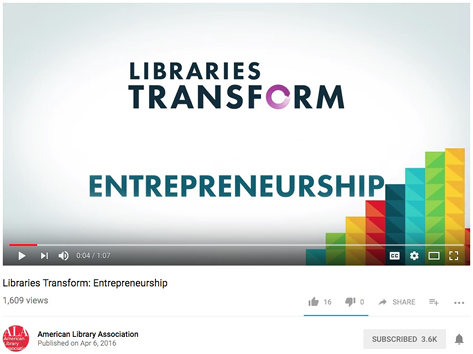
Figure 2.1
Screenshot of “Libraries Transform: Entrepreneurship” from the American Library Association video.
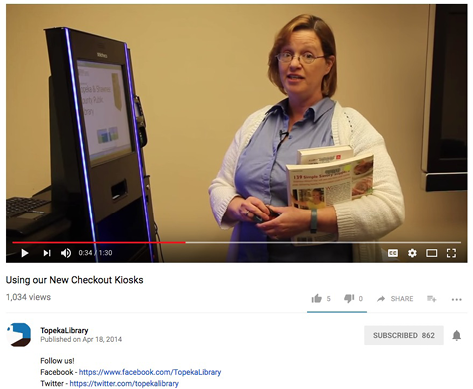
Figure 2.2
Screenshot of Topeka & Shawnee County Public Library’s “Using Our New Checkout Kiosks” video.
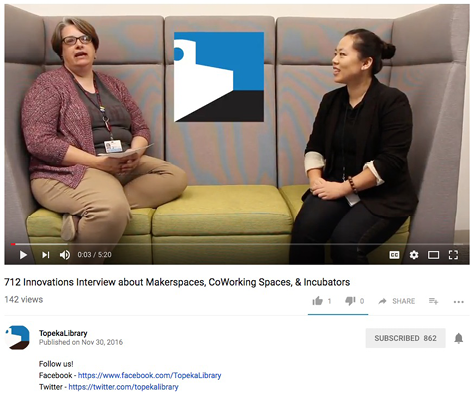
Figure 2.3
Screenshot of Topeka & Shawnee County Public Library’s “712 Innovations Interview” video.
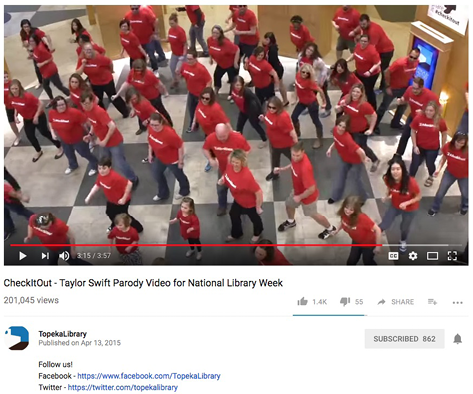
Figure 2.4
Screenshot of Topeka & Shawnee County Public Library’s “CheckItOut” video.
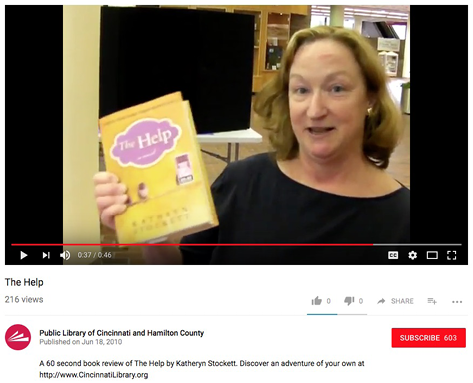
Figure 2.5
Screenshot of the Public Library of Cincinnati and Hamilton County’s book review video.
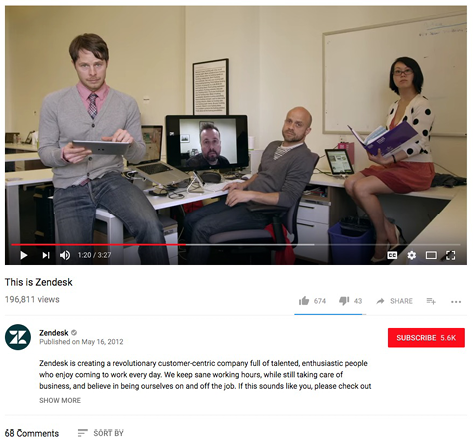
Figure 2.6
Screenshot of Zendesk’s company culture video.
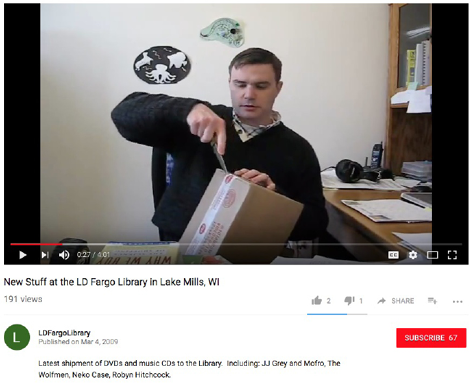
Figure 2.7
Screenshot of a library unboxing video.