Chapter 4. Video Tools and Software
Now that you know what types of videos to make and have learned some best practices to make your videos stand out, you need to start making them! And to do that, you will need equipment and software.
This chapter explores camera options; ways to enhance the quality of your videos with microphones, better lighting, and lenses; and ways to stabilize your video camera. We’ll also look at software—mobile apps for your smartphone video rig and editing software options.
Before we jump into equipment options, I should say this: there are thousands of options in today’s video-making world. There’s no way I can include everything here! I will include options I have used or that other video makers have recommended.
Camera Options
You can’t make a video without a camera, so considering the options is a good place to start.
Smartphones
For starters, the camera in your pocket—your smartphone—is a great option. Most of you reading this have one, and I’ll guess you purchased it within the last three years. That means it has the capability to record quality videos.
I currently have an iPhone 6s—a slightly older phone that I will probably replace soon. That said, it is capable of creating 4K video, although I usually keep my settings at 1080p HD video at 60 frames per second (fps). That gives me a good video file that will work great on YouTube or Facebook and will also translate well to a larger screen. Android smartphones will also be able to make HD-quality videos.
Point-and-Shoot Cameras
If you want to upgrade from a smartphone, your next option is an automatic point-and-shoot camera. These are also known as compact cameras. Point-and-shoot cameras are usually pretty small. They also don’t have detachable lenses. That said, they are versatile and work great for making videos as well as taking quality photos without much fuss. Cost-wise, they tend to be under $1,000.
Currently, two of the most recommended point-and-shoot cameras for creating video are:
- Canon PowerShot G7 X Mark II (see figure 4.1)
- Sony RX100 Mark V
Both of these cameras record HD-quality video. I own the Canon camera and can vouch for it. Although you can’t attach an external microphone to the camera, the built-in microphone does an adequate job of capturing sound, especially when doing a talking-head type video. It also has a flip screen, so you can see what the camera is capturing. That way, you can make sure you are, in fact, aiming the camera at your head!
DSLR Cameras
An upgrade from a point-and-shoot camera is a DSLR camera. These can be pricey—and can continue costing money as you purchase more lenses and accessories. But they are also the modern standard for capturing photos and videos and are a great addition to anyone’s video equipment arsenal.
All DSLR cameras will have a large variety of options for lenses and have attachable accessories like lighting or an external microphone. Canon and Nikon are the most popular DSLR cameras, and both do a great job at video.
Here are some examples of DSLR cameras that people tend to use for making video:
- Canon EOS Rebel T7i: This is a lower-priced camera. You can find one with a basic starter kit lens for around $750. This camera is good for those just learning to make videos and will quickly get you into the world of DSLR cameras.
- Canon EOS 80 D: This camera costs $200 to $300 more than the Rebel and has more options, including a 45-point autofocus system, and the body is weather resistant.
- Nikon D3400: Nikons tend to be less expensive than Canon cameras. This one will run you approximately $500 with a starter lens included.
- Nikon D7500: Like the Canon 80D, this more expensive Nikon camera has more features and a better body. It costs a little over $1,000 for a basic camera and lens.
Mirrorless Cameras
The newest types of cameras are mirrorless cameras. DSLR cameras have an optical mirror inside the body of the camera, but instead of an internal mirror, mirrorless cameras use a digital display system and a digital viewfinder (or no viewfinder).
With no mirror inside the camera, mirrorless cameras are often smaller and lighter than their larger, heftier DSLR counterparts. They also use interchangeable lenses like DSLR cameras.
Why purchase a mirrorless camera instead of a DSLR camera? Because mirrorless cameras are usually smaller and lighter than DSLR cameras, they are easier to hold while making videos. They also make slightly sharper-looking videos, since there is no mirror involved. My guess is that mirrorless cameras will eventually take the place of DSLR cameras in the professional photography and videography world.
Here are some examples of mirrorless cameras that are used for shooting video:
- Sony Alpha a6000: The camera and a basic multipurpose lens currently cost around $700.
- Sony a7: This is a step up from the Alpha a6000 and costs around $1,000. It’s larger and has more features, including better focus systems and on-board options.
- Panasonic LUMIX G7: This is Panasonic’s version of a mirrorless camera and is a great option for creating videos. It costs around $500.
- Canon EOS M50: If you like Canon cameras, you can get this mirrorless option. It costs around $700. If you already have Canon lenses for a DSLR, they will work with this camera if you buy a lens adapter.
Camcorders
One drawback to using a camera for taking videos is the length limitations built into the camera. Most cameras allow you to make a video that is only approximately twelve to fifteen minutes long. This is because a camera might overheat if it continually runs for too long. It’s really made for taking photographs and short videos (even though it has fancy video features). Some cameras also have a file size limitation.
For most videos, with multiple shots and clips, you won’t go much beyond a couple of minutes of video at a time, and so you will be well under that upper video-length limitation.
But maybe you want to make a video of an hour-long presentation. In such cases, a modern video camcorder—made specifically for video—is what you need.
Here are some examples of dedicated video cameras:
- Canon VIXIA HF R800: This is a relatively inexpensive camera (coming in at around $220) that has a lot of great features. Some of those features include a 57× zoom, microphone and headphone jacks, and a way to mount a microphone or a light on top of the camera. It’s also small and lightweight, so it’s easy to work with.
- Canon VIXIA HF G40: This one costs more than the R800—closer to $1,000. It also has more features and is a bit more solidly built. One handy feature of this camera is a dual SD card system. This feature allows the camera to automatically switch video recording to the second media card when the first one fills up. I don’t know how many times I have missed two to three minutes of video action because an SD card filled up and I had to quickly switch the cards or find a creative way to pause at a break so I didn’t miss anything important. This feature alone makes this a very useful camera!
- Panasonic HC-V770K: This camera costs about $500 and has an interesting feature. It allows you to pair your smartphone with the camera and use your smartphone as a secondary camera. This gives you a variety of shooting angles and picture-in-picture images.
- GoPro HERO6: A GoPro is an action camera, so it does a great job of capturing action videos—like at sporting events. It also does well at capturing time-lapse videos and can even go underwater up to 33 feet. This one runs approximately $400.
Webcams
Sometimes you don’t really need a fancy camera. Instead, you need a simple webcam. Webcams can easily capture you in front of your laptop or desktop computer. Obviously, webcams are necessary for videoconferencing. They are also easy to use for livestreaming to Facebook, Twitch, or YouTube.
Some webcam options include
- The webcam built into your laptop or computer monitor. If you have a fairly new computer, the built-in webcam should take quality video.
- Logitech C922 Pro Stream Webcam: This is one of many types of external webcams you can use. This one includes a six-foot cable, so you can detach it from your computer and move it around a bit. It will also swivel on its base (unlike the webcam built into your laptop). It takes up to 1080p HD quality video, has a built-in stereo microphone, and will definitely up your livestreaming game! It costs only $80, so it won’t set you back much at all.
Drones
Finally, let’s talk about drones. Have you watched a YouTube video with a slow-motion flyover? The creators were using drone footage in those videos. Drones are great for aerial shots and can be used for a wide variety of creative video shots.
Drones are a cheap way to do things that used to cost a lot of money. Aerial shots used to require a helicopter or an airplane. High overhead shots used to require some pretty costly cranes. Now, all you need is a drone to do some of the same types of shots.
DJI is arguably the best-known drone maker right now. Here are two options of DJI drones, one a beginner drone and one a more intermediate model:
- DJI Spark Quadcopter: This is a beginner drone and costs approximately $400. What’s it do? Quite a lot! It takes steady 1080p HD quality video. It will also capture 12MP photos. It has GPS and a vision-based navigation system with 3-D obstacle detection, so it is purportedly easy to fly.
- DJI Mavic Air: This is an intermediate-level drone and costs around $1,000. It has better stabilization than the Spark and can take 4K video at 30 frames per second. It also has up to 8GB of internal storage. It flies faster than the Spark (43 miles per hour instead of 31 miles per hour) and has a longer maximum flight time of up to 21 minutes (approximately 15 minutes for the Spark).
Microphones
Now let’s discuss making videos sound better through the use of an external microphone. These days, most cameras have an internal microphone built in. So why do you need an external microphone?
Most microphones in internal cameras sound bad, especially when you are not close to the microphone. The audio quickly starts sounding tinny as you back away from the camera. Also, internal microphones tend to pick up a lot of surrounding room and environmental noise, so you’ll hear a lot of echo in the room or wind and traffic noises.
An external microphone will easily fix those audio problems. Many modern cameras have external microphone input jacks built into the camera: that means you can plug a microphone directly into the camera.
If your camera doesn’t have a microphone input jack or limits the types of microphones that can be used (like a smartphone), you can still get better sound for your videos by recording the audio separately from the video. To do that, you will need to combine the video and audio files during editing (thankfully, there’s an easy way to do that—more on that in the software section below).
What are some good options for microphones? Here are some of the cheaper basics.
Lavalier Microphones
Lavalier microphones are those tiny microphones that newscasters use that are unobtrusively clipped onto a shirt. They are also called clip-on microphones. There are a wide range of lavalier microphones, from really inexpensive to pricier, more professional options.
Here are examples of both:
- BOYAS BY-M1 microphone: This is an inexpensive microphone, costing only $20 on Amazon! It has a 20-foot cable, so you can move around a LOT while recording. It also has a boost switch that lets you select if you are using a smartphone or DSLR and camcorder style cameras.
- Sennheiser EW 112P system: A huge step or two (or three) up from the BOYA microphone is a Sennheiser wireless lavalier system. You’ll get professional-sounding audio and no cables. You’ll also have to figure out how to use a more complicated wireless microphone system.
Shotgun Microphones
Lavalier microphones work great for interviews or for anything that requires a microphone clipped onto a single person. But what if you want more movement in your video or want to capture more than just a single person talking? If this is the case, you might think about getting a shotgun microphone. These are long microphones that can usually be attached to your camera using the hot shoe mount on top.
Here are a couple of options for shotgun microphones:
- RØDE VideoMic Pro: I use one of these. RØDE Microphones is an Australian microphone company that has focused on microphones for mobile video production among other things (see figure 4.2). This microphone is easy to use: just plug it into your camera, and you are ready to go. It has a couple of switches on the back of the microphone, including a high pass filter and a boost/cut switch that helps make quick audio volume adjustments—and a shock mount system that helps reduce camera noise. It requires a battery and costs around $200.
- RØDE VideoMic GO: This is a less expensive option from RØDE. This microphone is simpler—no extra audio switches and no battery—just plug it into your video camera, and you are all set. It costs around $80.
- Sennheiser MKE 400: This microphone is similar to the RØDE VideoMic Pro. It also needs a battery and costs around $200.
Handheld Microphones
Sometimes you need a handheld microphone. For example, they are great for man-on-the-street interviews. Handheld microphones usually include longer handles that you can tilt toward people during an interview. They are tailored to pick up voices and have internal noise-reducing systems built in for handling noise from hands.
Options include
- RØDE Reporter, which costs about $130.
- Sennheiser MD 46, which costs about $200.
- Shure VP64A Omnidirectional Handheld Microphone, which runs around $90.
You will need a way to connect a handheld microphone to your video camera. There are a few ways to do this. You can purchase some microphone cables and adapters that will connect directly to a camera, or you can purchase a small microphone input device built for cameras. These attach directly to a camera using the hot shoe mount. Zoom and BeachTek both make adapters for this.
You can also use practically any microphone with an external recording option, or you can look like a reporter on the street and use a wireless controller. The best choice for this option is the RØDE RODELink Newsshooter Kit. It’s a one-microphone wireless system that lets you plug the receiver directly into a camera.
Mobile-Friendly Microphones
The microphones listed above all work well for DSLR type cameras. But what if you want to use your smartphone or tablet to make a video? There are some great options for mobile devices these days.
Here are some examples:
- The BOYAS BY-M1 microphone mentioned above works great with smartphones.
- RØDE smartLav+: This is another nice lavalier microphone option for smartphones. It costs around $80.
- RØDE VideoMic Me: This is a small shotgun microphone that attaches directly to a smartphone via the headphone jack. Newer iPhones will need the VideoMic Me-L, which uses a lightning connector. It also has a built-in headphone jack for monitoring your recording live. It costs about $60.
- RØDE i-XLR: This handy little adapter lets you plug a dynamic XLR microphone directly into an iPhone. It includes a headphone jack for monitoring and includes a –20dB pad switch for volume control.
External Recorders
Sometimes you have microphones but don’t want to purchase a wireless system. Or you don’t have the option of plugging microphones directly into your camera (like with a point-and-shoot camera). What do you do?
Thankfully, you can record your audio separately on a portable audio digital recorder. Most of these also have microphones built into the device, so it might be all you need.
There are many options. Here are some to start with:
- Zoom H1n Digital Handy Recorder: It has a stereo microphone built in and a 3.5 mm input jack so you can plug a microphone into it (like a lavalier microphone). It costs about $120 (see figure 4.3).
- Zoom H6 Handy Recorder: This is a more full-featured option from Zoom. You can plug up to four microphones into it using normal XLR microphone cables. It costs $350.
- Tascam DR-40 4-Track Handheld Digital Audio Recorder: This is similar to the Zoom H6. It costs $180. You can plug in two microphones.
Lighting Options
I have already covered some simple best practices for lighting in chapter 3. If you want to step up your lighting game, what types of lights should you buy?
Shop Lights
If you want a simple and inexpensive way to add some light to your videos, visit your local hardware store and purchase some basic, cone-shaped, clamp-on shop lights (see figure 4.4). Use a daylight lightbulb and—tada!—instant lighting. Clamp-style shop lights at Home Depot currently run about $9 (you will also have to buy a lightbulb).
LED Lighting
A big improvement over shop lights is LED lights. These have come down in price, and you can find some inexpensive, and non-bulky, lighting options that will work for your video lighting needs.
Some examples include
- Neewer CN-304: These cost around $50 on Amazon. You’ll also need to buy a rechargeable battery, which will run around $15. These lights are dimmable, so you can adjust the brightness. They can also be mounted on a camera hot shoe mount, or they can be mounted on a separate stand.
- TOLIFO Photo Studio 176: These run around $30 on Amazon. They are similar to the Neewer lights, but a little smaller. These will also need a battery or a DC power supply.
- Dracast LED1000 Pro Bi-Color LED 2-Light Kit with Stands and V-Mount Battery Plates: This kit is very different from the smaller, inexpensive LED lights. This complete setup works for both photo and video settings and includes two 12×12 inch LED panels, each with a multivoltage power supply, a case, and a light stand. This kit costs about $1,100. My library has two of these kits.
Lenses
DSLR Lenses
DSLR and mirrorless cameras need lenses. Thankfully, the basic kit lens that comes with many of these cameras works just fine and will get you started. But if you want more options for photos and videos, you’ll need to buy some different lenses. Warning: camera lenses expenses can be a bottomless pit. There are a TON of lenses, and eventually you will want them all (see figure 4.5)!
Here are some basic DSLR lens types to consider for video work (look for similar types of lenses for mirrorless cameras):
- The kit lens (for example, Canon’s EF-S 18–55mm lens). This is a basic, multipurpose lens that comes with some DSLR cameras. It’s a fine starter lens.
- An ultra-wide angle zoom lens—like the Canon EF-S 10–18mm f/4.5–5.6 IS STM lens. This is a popular lens for vloggers to use. It allows you to get close to the camera (like a vlogger does) without filling the frame with your head. Wide-angle lenses capture a lot more of the background. Obviously, they also work well for wide-angle shots in other settings.
- Canon EF-S 18–135mm f/3.5–5.6 IS STM. This is another all-around lens. It’s a standard zoom lens, but zooms better and farther than the average kit lens. Both this lens and the 10–18 mm lens use something called a stepper motor (STM designation) in the lens, which keeps the lens quiet while it’s continually autofocusing. That’s a good thing. Otherwise, a microphone mounted on the camera would pick up the lens motor noise.
Smartphone Lenses
If you have a smartphone, there are clip-on lenses you can purchase. Many smartphones have good cameras, but the lenses are pretty basic, and the digital zoom that’s built into the phone quickly degrades in image quality the farther you zoom out. If you want a wide-angle shot or a telephoto shot, you are out of luck.
Thankfully, there are a handful of companies that make add-on lenses for smartphones. Here are some examples:
- Olloclip: I’ve used Olloclip lenses for a few years (see figure 4.6), and they really extend the performance of my iPhone’s camera. The Olloclip lens slides onto your phone and provides you with lens choices. The basic lens kit includes a wide-angle, telephoto, fisheye, and macro lens.
- Moment: Moment lenses are a little more expensive than Olloclip lenses. You need to choose a case and a single-purpose lens (like a wide-angle or telephoto lens). They provide greater image clarity than the Olloclip lenses.
- Zeiss ExoLens: This is yet another add-on lens to consider adding to your arsenal.
Olloclip
Moment
Zeiss ExoLens
Stabilizers
You’ll need something to keep your camera steady when recording. Some people prop the camera on books (which you probably have a lot of!) or balance the camera on a table or chair. If you want to look more professional, though, buy the appropriate tool for the job.
There are many types of stabilizers. Here are some different options depending on your needs:
- Tripods: A tripod is a basic necessity for both videos and photography, so it’s a good purchase to make. Tripods cost anywhere from $30 on up to hundreds of dollars. The more professional tripods last much longer, and you can purchase different tripod heads for them, for different shooting needs.
- Handheld gimbal: There are a lot of handheld motorized gimbals on the market. Gimbals keep your videos steady, even when you are walking, running, or riding in a car. Gimbals can help make your action videos look more professional (i.e., less bouncy). Look for gimbals from DJI or Zhiyun. They will cost anywhere from $130 to over $700, depending on what type of camera you are using and the features needed.
- Bendy tripod: If you’ve ever watched a vlogger in action, you’ve probably seen the person using a handheld, bendy tripod of some sort. Usually, it is the JOBY GorillaPod tripod. These are short tripods with flexible tripod legs. The legs are sturdy enough to use as a handheld stabilizer. The legs can wrap around pretty much anything—trees, poles, fences, and so on. They cost around $80 (prices vary, depending on the size of the camera you are using).
- Pistol grips: Finally, you might need to move your camera away from your hand. You’d be surprised at how even moving your camera onto a short handle or grip will help keep your camera steady. Olloclip makes a grip for smartphones. You can also search Amazon for “camera pistol grip” and you’ll find a lot of options for $10 to $20. These grips are basic: screw them into your camera (or into a smartphone holder), and you are ready to go.
JOBY
Software
We have talked a lot about cameras and camera accessories. Now we need to look at software! First, let’s cover software needed for your smartphone. Again, there are many options, and I’m covering the more popular ones.
Video Recording Apps for Smartphones
- The app that comes with your phone. The easiest app to use is the camera app that came with your smartphone. Choose video, hit record, and you are ready to go. Go into your smartphone or app settings to choose different video file options. For example, I can record video anywhere from 720p on up to 4K video at 30 fps on my iPhone. I usually keep video settings on 1080p HD at 60 fps, which makes video that’s easy to edit and can be used on YouTube and Facebook.
- FiLMiC Pro: If you want more options when recording, this is the app you need. FiLMiC Pro is a professional-quality video recording app for mobile devices, and it provides you with many more manual video settings that you don’t get on your phone’s basic camera app (see figure 4.7). I think it’s a must-have for mobile video.
- FiLMiC Remote: This app gives you remote control over the FiLMiC Pro app. For example, you can record on your iPhone and use FiLMiC Remote to remotely see what’s on your iPhone screen. This allows you to walk away from your smartphone and still have control of your screen.
- Hyperlapse: Built by Instagram, this app lets you record stable time-lapse video. It can be fun to use, and you can post the video from Hyperlapse to Instagram, share it with other social media channels, or save it to your mobile device for further editing.
Video Editing Apps for Smartphones
- iMovie: On iOS devices, you can use iMovie to edit the video.
- Adobe Premiere Clip: Do you have an Android phone or an iPhone and are simply not interested in iMovie? Try this Adobe app for your mobile video editing needs. It’s very easy to use.
Video Editing Software for Computers
If you are editing video on a normal computer, you’ll need video editing software.
- iMovie: This is very basic video creation software for Apple computers, and it’s available for all Macs. It’s easy to use and comes with a lot of options.
- Final Cut Pro X: This is Apple’s professional video editing software for Macs. It gives you more options and control than you’d get from iMovie. It also costs more!
- Adobe Premiere Elements: This software is similar to iMovie, but with an Adobe twist to it. It’s a basic editing tool that will get you started, and it works on both PCs and Macs.
- Adobe Premiere Pro: This is the professional version of Premiere and has a lot of bells and whistles that you can’t get in Elements. To use this software, you’ll need an Adobe Creative Cloud subscription, which currently runs $20.99 a month for a single app.
- PluralEyes: If you recorded your audio separately from your video, PluralEyes is your secret weapon. Drop in your video file and your audio file, and this software automatically syncs them up. I use it all the time, and it’s like magic.
PluralEyes
https://www.redgiant.com/products/shooter-pluraleyes/
Tricking Out Your Smartphone
We have reviewed a LOT of equipment and software. What should you buy first? Thankfully, you don’t have to decide right away, because you really don’t have to buy much of anything to start.
Simply use the default camera app on your smartphone and start making videos. Install the iMovie or Adobe Premiere Clip app to make some quick edits, and upload to YouTube and Facebook. You just made your first video!
Use this method for a while to familiarize yourself with the process of making and editing videos. Once you’ve done a few videos, start to assess things. Think about things like this: How’s your audio compared to other videos on YouTube? Could your lighting be improved?
Remember that your goal is not to be Steven Spielberg—it’s to get your ideas across in a video setting, without distracting people from your message. Weak sound, dim lighting, and unnecessary pauses that can easily be edited out of the video all distract and take away from your message. To communicate as effectively as possible, you will want to work on editing, on making better videos, and on being succinct with your video message.
I suggest that your first purchase should probably be a better microphone. At this point, you are still using your smartphone, so get a smartphone-friendly microphone mentioned above. Maybe also look into a cheap LED light for shooting video indoors.
While you are at it, start thinking about purchasing a stabilizer of some sort. What you’ll need depends on what types of video you are creating. For example, are you making simple book review videos or “what’s happening this week” videos where you stand in one spot and talk to the camera? In that case, you should purchase a tripod with a smartphone adapter. Are you making videos that involve a lot of walking? In that case, a tripod and a handheld gimbal might do the trick.
Regardless of your specific projects, always remember your goal: getting your message across without distracting. For not too much money, you can turn your smartphone into a nice little video camera and easily communicate with your community through video.
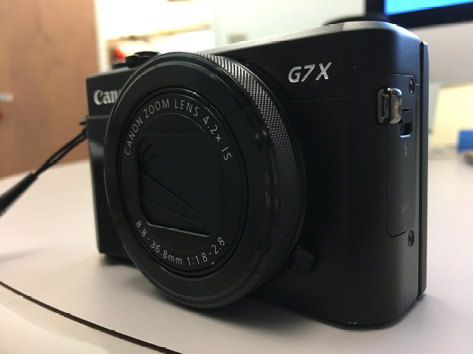
Figure 4.1
David’s Canon PowerShot G7 X Mark II camera.
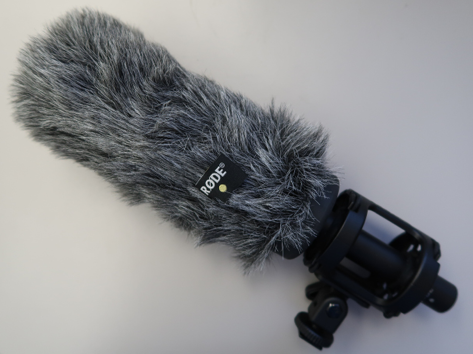
Figure 4.2
Topeka’s RØDE microphones.

Figure 4.3
David’s Zoom H1n Digital Handy Recorder.
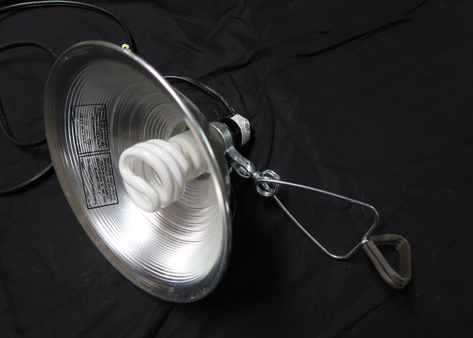
Figure 4.4
Inexpensive shop light.
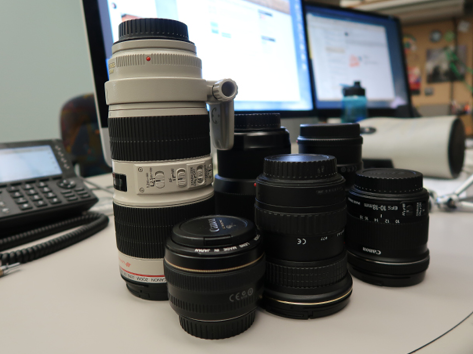
Figure 4.5
Topeka’s DSLR lenses.
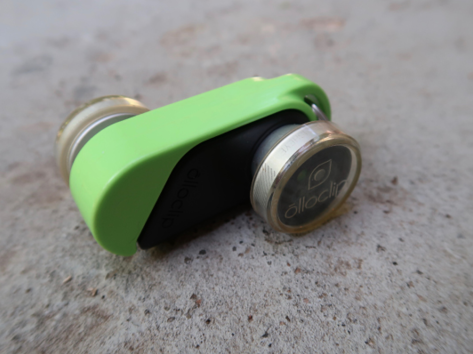
Figure 4.6
David’s Olloclip iPhone lens.
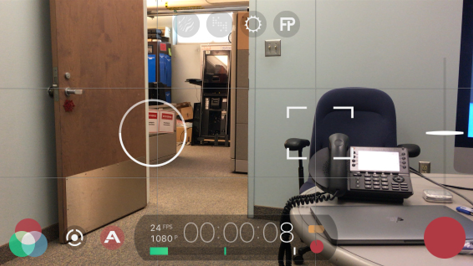
Figure 4.7
Screenshot of FiLMiC Pro.