Chapter 3. Snapchat in the Library
Snapchat started in 2011 as a place where users could communicate through photo, video, and text messaging that would disappear once viewed. It was very much a closed network platform with an interface that seemed to be intentionally complicated and geared toward the online habits of teens (Bloomberg dedicated an entire article to this concept entitled “How Snapchat Built a Business by Confusing Olds”1). It increased its reach and application in the brand and marketing world with the introduction of Snapchat Stories, collections of chronological snaps that expire within twenty-four hours (just like Instagram Stories). Unlike Instagram (IG), Snapchat’s focus is still more closed network with the deliberate absence of public-facing follower numbers and usernames, engagement metrics (i.e., likes, comments, views, etc.), and permanent posts (unlike IG feed posts). Also, unlike its rival, it focuses on a more lighthearted, goofy vibe with lenses, filters, and augmented reality components (e.g., the dancing hotdog).
In the realm of teen users, while IG is rising in the Gen Z population ranks, a recent survey revealed IG and Snapchat to be about neck and neck with monthly usage and Snapchat still leading the way as teens’ “favorite social platform.”2 However, to address the ghost-shaped elephant in the room, Snapchat does seem to be losing in the sparring match against its mimetic rival.3 Recent reports of quarterly earnings show a decline in daily active users and share prices.4 Some criticize the app for trying to do too much, with private peer-to-peer sharing getting lost in the hullabaloo of redesigns, partnerships, and expansions5 (although it would be great if Snapchat offered something similar to what it is doing with Amazon and letting users scan a physical object or barcode and then view a card showing product details!6). So right now it seems to be a waiting game. The next year should reveal whether the app will continue to remain relevant, increase its user base, and keep advertisers interested. It is also important to remember that Snapchat still has around 186 million daily active users worldwide, which is significant.
As Snapchat is a complex topic, which would undoubtedly exceed the textual confines of this brief issue of Library Technology Reports, I will not be covering a lot of logistical information, but rather will be focusing on ideas for content generation and account optimization specific to libraries. There are a variety of resources you can use to get up to speed on Snapchat, including their YouTube channel, HubSpot’s blog, and Hootsuite’s blog.7 I also periodically teach a Snapchat webinar for ALA Publishing eLearning Solutions that you can keep your eyes peeled for!8 Before we get started, there are a few terms and concepts that I would like to outline:
- Snap—A photo or video that you send to a user or publish on your Story, which is traditionally ephemeral and disappears after it is viewed. You can record up to six sequential ten-second-long video snaps for a total of a one-minute-long full snap.
- Snapcode—A QR code that lets users add you as a friend by hovering their camera over the Snapcode or taking a picture of the image (see figure 3.1).
- Screens and menus
- Home screen—A giant camera where you can take pictures or videos as well as navigate to the chat, discover, and profile screens.
- Shutter button—Located on the home screen. It is the tool used to take a picture (by tapping) or record a video (by holding).
- Memories menu9—Accessed by tapping the double portrait icon located below the shutter button, Memories is your personal archive within the app. To save a snap to Memories, you need to capture a snap and press the downward-pointing arrow icon on the bottom left of the screen. You can also upload non-Snapchat images and video from your phone’s camera roll, save them to Memories, and share them to your Story. I have my settings set to save content in both Memories and my camera roll so I can easily create and share content across social media platforms (Settings → Memories → Save To → Memories and Camera Roll).
- Chat screen—Accessed by swiping right or tapping on the chat bubble icon in the bottom left part of the screen. This is the space to chat one-on-one with users.
- Discover screen—Accessed by swiping left or tapping on the double rectangle in the bottom right part of the screen. This is where entertainment content lives with brands serving various shows and stories to users. You can also view your friends’ Stories on this screen (or via the chat screen). In effort to compete with YouTube and IGTV, Snapchat recently started offering short exclusive shows called Snap Originals.10
- Profile screen—Accessed by tapping your profile picture in the upper left corner of the screen. This is where you can retrieve your Snapcode, access the Settings menu, add friends, and manage your Snapchat Story.
- Settings menu—Accessed by tapping the gear icon in the upper right corner of the profile screen.
- Search menu—Accessed by swiping down. This is Snapchat’s single search bar where you can search usernames, topics, places, and so on.
- Home screen—A giant camera where you can take pictures or videos as well as navigate to the chat, discover, and profile screens.
If you want to learn more about navigation, Snapchat has a helpful video explanation.11
Optimization
Spreading the word announcing your presence is important not just when you start your account, but also after it has been established since there will always be new patrons visiting the library, moving to the area, and so on. Follower growth is dependent on how discoverable your account is. Discoverability is achieved directly on the platform as well as through promotion on your website, other social media accounts, and word of mouth. Listed below are some easy ways you can enhance the findability of your account:
- Optimize your username—This includes creating a username that is consistent with your @handles on other platforms as well as entering your full library name in the first and last name sections of your profile (rather than just your username). Including both your username and your full name helps those who try to find your account using Snapchat search (@orillia_library is a good example of an optimized username where they utilize orillia_library as their username and Orillia Public Library as their account name).
- Leverage your Snapcode, link, and username.
- Snapcode—Snapcodes can be used in a variety of different venues both online and offline. If you are in the beginning stages of account promotion, you could create a blurb in your newsletter, entry in your blog, and post on your other social media channels announcing your new account. One way many brands broadcast their Snapchat account is by periodically using their Snapcode as their profile image on Twitter and Facebook. In the offline realm, Snapcodes can be featured on business cards, posters, signs at the circulation desk, stickers, decals, bookmarks, buttons, handouts, and so on. Sites like Sticker Mule and Canva can help with designing these assets.12 Carlos Gil at Social Media Examiner highlighted retail store Tilly’s clever incorporation of hanging a giant decal of its Snapcode on its front door,13 which could be easily adapted for the library context. If you are at a conference, giving a workshop, or teaching an information literacy session, you could also include your Snapcode on your slide deck or Airdrop or text it during one-on-one discussions or networking.
- Custom Snapcode—You can create a more branded look by designing a custom Snapcode.14 Some excellent examples include the Snapcodes of the University of Michigan, National Geographic, and the Washington Post.15
- Hyperlinked Snapchat icon—“Follow me” Snapchat icons on websites are surprisingly absent in the library sphere. While not as convenient as adding a linked IG icon to your page, a hyperlink for your Snapchat icon can easily be generated using http://snapchat.com/add/[username] (e.g. http://snapchat.com/add/paigealfonzo). Since Snapchat is currently mobile-only, it works a little differently from other linked icons, sending the user to your Snapcode rather than the desktop version of the platform. In addition to your website, you can link your icon in your e-newsletter, blog, email signatures, and LibGuides. @NCSUlibraries’ website is a great example of how to include your Snapchat logo with your other “follow me” icons (see figure 3.2).16
- Username—You can use your Snapchat username in addition to or in lieu of your Snapcode on print marketing materials on items such as flyers, signs, and so on. You can also use this in a word-of-mouth setting by telling individuals to add you at assemblies, outreach visits, or one on one. Just keep in mind that textual entry is case sensitive.
- Snapcode—Snapcodes can be used in a variety of different venues both online and offline. If you are in the beginning stages of account promotion, you could create a blurb in your newsletter, entry in your blog, and post on your other social media channels announcing your new account. One way many brands broadcast their Snapchat account is by periodically using their Snapcode as their profile image on Twitter and Facebook. In the offline realm, Snapcodes can be featured on business cards, posters, signs at the circulation desk, stickers, decals, bookmarks, buttons, handouts, and so on. Sites like Sticker Mule and Canva can help with designing these assets.12 Carlos Gil at Social Media Examiner highlighted retail store Tilly’s clever incorporation of hanging a giant decal of its Snapcode on its front door,13 which could be easily adapted for the library context. If you are at a conference, giving a workshop, or teaching an information literacy session, you could also include your Snapcode on your slide deck or Airdrop or text it during one-on-one discussions or networking.
- Broaden your reach through settings—There are a few settings that you can adjust to enhance the discoverability of your account and content:
- Filters—Set to On. Gives you access to Snapchat geofilters.
- View My Story—Set to Everyone. Allows anyone to view your story whether or not they’ve added you as a friend.
- Contact Me—Set to Everyone. Lets anyone send you a snap whether or not they’ve added you as a friend.
- Show Me in Quick Add—Set to On. Includes your account in a user’s suggested friends list.
- See My Location—You can change this to My Friends, Ghost Mode, or Only These Friends, depending on your established social media policy. Set it to My Friends if you have a policy of adding patrons back, as it will enable them to easily locate your library on the Snap Map.17
- Decrease lag time—Snapchat accounts are in danger of being orphaned when the gung-ho individual who once handled the account vacates their position. To help avoid this lag time, utilize a dedicated library mobile device for the account (since Snapchat is currently mobile-only), store sign-in credentials in a secure but centralized location (such as your library’s intranet), and connect the account to a general email (rather than a person’s library email address or personal phone number).
Snapchat Tools and Features
- Snapchat Chat—You can communicate using text, Bitmoji, stickers, video, photo, voice calls, video calls, and as a group with Snapchat chat.18 Chats are active as long as you are in the chat screen and disappear once you navigate away. To save text (unfortunately not snaps), you can press and hold the chat, and it will be archived in the chat window.
- Snapchat Stories—–Snapchat Stories are a set of public-facing chronological snaps that are viewable for twenty-four hours. The focus of this content is to showcase “a day in the life.” Variants of Stories include the Live Story/Our Story, Campus Story, and Custom Stories/Geo Stories.19 Custom/Geo Stories are collaborative and open anyone who is given access (Custom Story) or is in a specific geolocation (Geo Story).
- Library Idea!—Create a Custom Story for a specific event your library is hosting, granting access to everyone within the radius of the library building for a certain amount of time. There is some risk involved with this approach as someone might submit questionable content. As the Story creator, you can delete undesired content, but it will take regular monitoring. Alternatively, you could add participants by username to give you more control over who submits. In my forthcoming article, one participant mentioned utilizing a “social media street team” involving vetted college student contributors to their Snapchat account.20 You could similarly do this at your event, giving a certain group of teens access to a Custom Story during an event (maybe have open applications to join the “event team” ahead of time). After the event, the Story can be saved to your phone’s camera roll to be edited, cross-posted on your other channels, or uploaded to the event page on your library’s website.
- Try it Out!—I have a Custom Story called Why Do YOU Library? To add to the Story, follow these steps: (1) add me, paigealfonzo, as a friend; (2) send me a chat or snap saying you want to be added to the story; (3) wait for my confirmation; (4) send a snap to the Story saying who you are, your favorite thing about being a librarian, and your favorite LC or Dewey Decimal classification area! As a contributor, you will be able to see others who have submitted within the same twenty-four-hour period.
- Library Idea!—Create a Custom Story for a specific event your library is hosting, granting access to everyone within the radius of the library building for a certain amount of time. There is some risk involved with this approach as someone might submit questionable content. As the Story creator, you can delete undesired content, but it will take regular monitoring. Alternatively, you could add participants by username to give you more control over who submits. In my forthcoming article, one participant mentioned utilizing a “social media street team” involving vetted college student contributors to their Snapchat account.20 You could similarly do this at your event, giving a certain group of teens access to a Custom Story during an event (maybe have open applications to join the “event team” ahead of time). After the event, the Story can be saved to your phone’s camera roll to be edited, cross-posted on your other channels, or uploaded to the event page on your library’s website.
- Snapchat Lenses21—If you have seen pictures of your friends with flower crowns or vomiting up a rainbow tongue, you’ve witnessed the magic of the Snapchat lens. Activated by tapping anywhere on the camera screen, these fun animations and augmented reality features can be added to a face (Face Lens) or your surroundings (World Lens). Some include additional functionality such as allowing two people to get in on the action (see figure 3.3), altering your voice, or prompting you with a command such as “raise your eyebrows” or “open your mouth.” In October, Snapchat released Cat Lenses, which should create hours of fun with your feline.22 Snapchat also recently brought lenses to the desktop environment, letting users don the dog face and all the other lenses while using “Twitch, YouTube, Skype, and Zoom.”23 (This could be very helpful for those hosting their book talks on YouTube.) With Community Lenses, anyone can design a lens and offer it via the Community Lens screen (accessed by clicking the smiley face [see figure 3.3]; for library ideas, see the next section).24
- Snapchat Filters25—Filters come in a few flavors: IG-style filters that add hues and tonal qualities to your image or video, frame filters that let you add sticker-type features such as the day or time, and geofilters, which are available only when you are in a certain location. Unlike lenses, filters are activated after you snap a photo or video by swiping right or left with your finger. You can also layer more than one filter, such as a geofilter and day and time filter by using the layering tool from the right side toolbar (see the next section for library-specific ideas for geofilters).
- Photo and Video Editing Tools—After you take a snap, there are several ways you can spice it up, add more information, and even attach a URL with Snapchat’s Creative Tools menu (which appears on the right side of your snap after it is captured). I am not going to discuss each tool in this chapter, but rather cover some ideas you can apply within a library context. If you are interested in going more in depth, Snapchat has a useful webpage devoted to the “how to” of each tool, and Hootsuite has a great “hacks” article.26 In figure 3.4, I have listed each tool’s label as a guide for the next section.
Content Tips and Ideas
In this section I present a few content ideas and tools that work particularly well on Snapchat. (For general topic suggestions and a comprehensive list of tools, see chapters 1 and 2 respectively.) Some things to keep in mind are that Snapchat is zany, not super curated or polished, and favors real-time sharing. You also don’t need to post content created on Snapchat on the platform itself, but rather as more of a graphic design tool. With the Save functionality, you can create a snap with, let’s say, a filter on a book face, save it to your phone, and then upload it wherever you want. (Not sure if that’s sacrilegious to graphic design purists, but hey, it sure beats hours of graphic design tinkering.) Before we dive into some of the more complex content ideas, I wanted to list some short tips and suggestions you can use to enhance your snaps:
- Diversify—Relying too heavily on one style or topic tends to cause users tune out over time. Hootsuite recommends Snapchat stories be around one minute, or potentially two minutes if you are giving a tutorial, using only about one filter and one lens per story.27 Diversification also pertains to your mode of delivery. @orillia_library reports that they occasionally send a snap directly to their followers, but only about once a week because otherwise people find it annoying.
- Insert a soundtrack—Add background music to your snaps by playing a song on your phone and then navigating to Snapchat to record a video while the song is playing in the background. You can also “name that tune” and share songs by tapping your Snapchat screen when a song is playing, courtesy of the partnership between Shazam and Snapchat.
- Create a boomerang-style video—When recording a video, use the loop tool to create fun boomerang-style snaps (see chapter 4 for some boomerang examples).
- Put a Cat Lens on it!—If you have any of these furry friends lying around your library, digitally adorn them with bread, googly eyes, or devil horns with Cat Lenses.28
- Take a peek behind the scenes—Take users behind the circulation desk and document how a book is processed, an after-hours staff event, “behind the stacks” features, “adventures in weeding,” “a day in the life of a [cataloging librarian],” or before and after pictures or videos at your next makerspace event! You could adopt something similar to Refinery29’s exclusive and quirky interviewing style with your library staff, highlighting some lesser known information about what they do.29
- Archive your content—YouTube is a common platform for archiving Snapchat Stories that you want to allow users to view after the content expires. Archive only your top or recurring content and organize them as a playlist, such as “Teen Book Tuesday.”
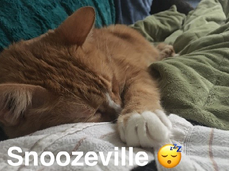
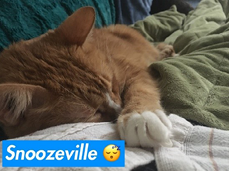
- Create legible text—If you hold up a book or a sign in selfie mode, the lettering will appear backwards. Avoid this by leading with a screenshot of the book’s text and then holding it up to talk about it in the next snap. Any textual snap should have a longer time expiration (maybe around ten seconds) to give users enough time to read it (this is done with the Stopwatch tool). Also, with the Text tool you can avoid hard-to-read text by including a background for your captions (see figures 3.5 and 3.6).
- Don’t just rely on the link—If you are promoting programming or a workshop on Snapchat, include relevant information, including the date and a summary of what is involved, as some users do not like to swipe up or click on links.
- Enhance your book talks—
- Set up an aesthetically pleasing backdrop. Epic Reads creates some excellent backdrops for its Book Haul videos.30
- Include one still image of the book. (This not only gives viewers time to read the title or take a screenshot, but also, since text appears backward in selfie mode, it enhances the clarity.)
- Keep track of the titles you talk about so you don’t repeat any. This can be especially helpful when you have someone new managing the account.
- Create a script of what you want to say on your computer to read while you’re recording your video to keep you on track.
- Occasionally use the face swap filter or add a filter to the cover of a library book (see figure 3.7).31
- End with a call to action (CTA) such as “check it out at [library branch]” or “swipe up to view it in the library catalog or place a hold.”
Utilize Geofilters and Custom Lenses
While requiring a little more elbow grease and time devotion (and potentially a bigger budget), designing a custom geofilter on Snapchat can be a fantastic promotional resource. One reason is that not only do geofilters entice patrons to use a filter and interact with the library on Snapchat, but also, when they are used, those patron’s friends can then see the filter, drastically expanding your promotional reach. @NCSUlibraries reported that they utilize two community geofilters (which are free) for the two main libraries on campus (see figure 3.8).32 They revealed that these “are the most engaging part of their account,” resulting in a current tally of 100,000 uses and a resultant 1.3 million views (which includes not only the initial user’s view but all their friends’ views). @NCSUlibraries and @TheRLPL both reported purchasing custom filters to promote specific events, with @NCSUlibraries explaining that they typically don’t use a radius larger than the library building and normally restrict the time frame to an hour before and after the event, and then the two hours during the event. Along this vein, you could also create a custom Snapchat lens, as opposed to a filter, for patrons to use.33 (Maybe a wiggling AR bookworm lens similar to this elephant is in your future!34). Since lenses are assigned a designated Snapcode, you could also incorporate it into a library scavenger hunt, with hunters unlocking the lens at the end.
Geofilters and lenses can be a great way to promote your library even if you don’t have time to manage an official library Snapchat account. If you don’t have the bandwidth or time to manage an official Snapchat account, you can create a “dummy account” (an unofficial account primarily used to give you access to Snapchat features), design a geofilter or lens, and make it available to patrons who visit the library. Nashville Public Library had the genius idea of hosting a geofilter contest before it had a Snapchat account to test the waters before making any commitments.35 If you are interested in creating a geofilter, Eventbrite has some useful design tips, including using your business name and logo, incorporating the event hashtag, using only the top and bottom part of the screen, and editing a geofilter template if you don’t want to create one from scratch.36
Harness Hilarity
Inject some humor with a Photoshop-style gag or a joke! One of the great things about Snapchat is that with the Scissors tool, you don’t need to use robust graphic design software to get a fun effect like @acclibraries’ giant cat post (see figure 1.3). Here’s how to do it: take a snap or upload a picture from your phone with an object that you want to cut → tap on the Scissors tool → use your finger to “cut out” your desired object → exit out of the snap → take a snap or upload a picture that you want to superimpose an object on → tap the Sticker tool → select the object you cut out → place it on your new snap (stickers can be resized by pinching them with two fingers) → send the snap to your Story or save it to your Memories or camera roll to be shared on another channel (see figure 3.9).
Jokes can also be a fun way to entertain your users. When crafting your quip, use your first snap to tell the joke and the second snap to reveal the punchline (see figures 3.10 and 3.11). You can also incorporate humor with fun or lesser known trivia, facts, or stats. GrubHub did this during the Super Bowl by sharing a series of three snaps explaining chicken orders during the event.37
And then don’t forget about the obvious lenses, filters, and stickers. Put a new spin on #BookFaceFriday with Snapchat’s face swap filter or multi-person lens feature! Severn School Library had the great idea of creating an annual book face swap contest that resulted in some wonderfully ridiculous results.38 They also point out that Snapchat isn’t the only tool for swapping faces, with Face Swap Booth, Masquerade, and Photoshop all providing similar resources.39 In “Snapchatting with Hugo Cabret,” Travis Jonker showcased the magic of both the face swap and the “filter face.”40
Work in Some @Mentions and Hyperlinks
Snapchat now allows you to @mention other Snapchatters, which serves as a resource for getting others’ attention as well as encouraging patrons to @mention your library when they are snapping.41 The latter has the potential benefit of increasing your followership since those who see a snap @mentioning you have the option to directly add you as a friend.
One of the most popular features mentioned by librarians I chatted with was the hyperlink (which is added using the Paperclip tool). While you don’t want to overdo it with this feature (remember diversity is the key), I would recommend using it when you want to direct library users to a specific action (e.g., signing up for a workshop or placing a library hold [see figure 3.12]). The option to place a book hold via Snapchat is advantageous in a few ways. One, it keeps users on Snapchat, allowing them to place a hold and then toggle back to viewing Snapchat Stories. Two, it might create a more comfortable environment for learning about and accessing books on topics that patrons might not want to inquire about in person (such as a book with a transgender protagonist).42
Answer Questions or Provide Instruction
Snapchat chat gives you the ability to answer patron questions and offer reference services directly in the app. Not only can you chat using text and URLs, but you could also experiment with the video calling feature and the front-facing camera if you want to show your screen to someone. One example similar to reference services is the case of Staffordshire University. In 2017, this university let students ask their admissions questions via Snapchat using photo, video, or chat messages.43 Another idea could be to offer a small virtual information literacy (IL) session using group video calling (which supports up to sixteen friends at once).
If you do not want to offer direct chat services, you could highlight IL takeaways or short tutorials or answer reference FAQs using Snapchat Stories. When creating, keep them short, with an introductory snap followed by an explanatory snap (see figures 3.13 and 3.14). A few brand examples of this include Talya Minsberg’s demo of how to find the New York Times on Snapchat, Michael Britt’s real-life application videos created for his introductory psychology class, and Refinery29’s Snapchat Story (be sure to check out how well they break up the story with still shots of text).44 One idea for a recurring FAQ feature could be to ask users to snap you questions during the week and then designate a day every week or month to answer them. You can also incorporate a video with audio and text, using the latter as a way to highlight key points (since many individuals consume content without sound) or as your closed captioning.45
Incorporate Live Action Snaps
Snapchat is all about in-the-moment authentic sharing, making it ideal for live-action snaps both in everyday contexts and during big events. When creating a Story around an event, share three to five “highlight” snaps throughout the day. Alternatively, you could do a few live-action snaps and then a “round-up” of your best snaps at the end of the day. Netflix’s Snapchat Story promoting Bill Nye Saves the World is a great example of an event Snap Story that focuses on just the highlights.46 Location features such as the Snap Map can further enhance offsite events where you want to encourage participation.47 If you have the feature turned on in Settings, patrons will be able to tap your profile on the map and view your Story and location. What Are You Reading Wednesday is another relevant context for a live-action snap. For example, @NISDStevensLib takes snaps of what students are reading in the library right then or grabs teachers in the hall to quickly ask them about what publication they are currently enjoying (which are even more fun when you throw a filter on them).
Create a Contest
Contests are very effective avenues for promotion, growing your followership, and increasing your engagement in creative and interactive ways. In 2014, I created a library Snapchat contest following the National Library Week theme of “Lives Change at Your Library.”48 This involved students sending me a short video explaining what book changed their world outlook and why. One thing that really helped participation in this contest was partnering with university faculty on my campus who helped me promote it and even offered extra credit to students who submitted. Other library contests I have seen include teensppl’s Halloween costume snap contest, Karen Jensen’s snap-venger hunt, Nashville Public Library’s geofilter contest (which served a twofold benefit of library promotion and student graphic design learning), and Severn School Library’s book face swap contest.49 Some standout brand examples include the University of Michigan’s “show us your best selfie,” University of Waterloo’s Warrior Pride contest, Harper’s BAZAAR’s #BazaarStories, and Google and Snapchat’s joint effort, the filter design contest.50 When running your own contest, promote it far in advance and follow up with snaps of the various entries and the winners after the contest has concluded.
Aspirational Accounts to Follow
I love following libraries and other organizations that have a penchant for Snapchat brilliance. However, Snapchat’s peer-to-peer sharing focus and case sensitivity make it annoyingly hard to browse. To help with that, I have created a list to help get your Snapchat wheels turning. Following accounts can be helpful if you are new to the platform and interested in seeing how other creatives are engaging with their audiences as well as for sparking new ideas. This does not have to be an exact replication of content but rather an opportunity to get inspired. But a healthy amount of replication is not necessarily a bad thing if proper attribution is included. It can be, in fact, an essential element of making something go viral online and hashtags succeed. Where would the dancing hotdog or “cat breading” be without repeated use and creative application?
General Brands
- bookriot
- grubhub
- hubspotinc
- mashable
- mplatco—Michael Platco is a wizard with the drawing tool.51
- popsugar
- sourpatchsnaps
- tacobell
- washingtonpost
Libraries
- aacpl
- cincylibrary—@CMCLibrary stated that Cincinnati Public Library does some interesting “book of the day” snaps.
- cheshirelibrary
- CMCLibrary
- jpl_tab
- librarycommerce
- libraryul
- orillia_library
- NCSULibraries
- NISDStevensLib
- uwflibraries
If you are interested in following more libraries on Snapchat, I have a running list on my blog.52
Analytics
Tracking analytics in Snapchat is notoriously tricky because the metrics disappear once the Story expires. If you are new to retrieving Stories metrics, Snapchat has a helpful video.53 Currently, the easiest way to record Story metrics is to do it manually in a spreadsheet. Data points you will want to record include the following:
- Views—Each view in your Story counts as a unique view (one view per person, regardless of how many times that person watched your story). Record both total Story views and views per snap. That way you will be able to calculate your drop-off rate and determine if any content adjustments need to be made.
- Screenshots—This is a good indicator of how valuable your information is.
- Story snaps—@CMClibrary stated that they like to record the total number of snaps sent in each Story. This is a great way to determine the optimal length of your Stories.
- Content type—Keep track of the kind of content (photo, video, photos or videos with text or lenses, filtered images, book talk that’s uploaded all at once versus in spurts throughout the day) to see what content type resonates most with your audience.
- Subject—@CMCLibrary recommends including the title or subject of the snap in your spreadsheet so you can see what plays well and what is not as exciting.
- Time of day—Track the day and time you send each snap in your story to calculate the snap that gets the most views and screenshots, and then aim to post at that time or day each week. Make sure to post at different times of day and record the unique views and completion rates during those periods.
- Followers—You cannot get a list of followers from Snapchat, so this will have to be done manually in a spreadsheet when you are notified that you have a new follower. @libraryul discussed hearing about an alternative method for approximating follower count by taking the number of story views and multiplying them by 1.5.
- Chats/responses—Record the number of conversations and snap responses you receive per day or week.
- Outliers—@orillia_library stated that if there is a spike in views for a specific Story, they will save it to Google Drive for later qualitative analysis.
After you have collected all your data, look at it on a regular basis, such as every month, quarter, or semester. Hootsuite provides a few useful calculations you can use when looking at your data:54
- Story completion rate—This will tell you how many people watched the whole story and is calculated by dividing your final view count by the first view count.
- Fall-off rate—This enables you to pinpoint the areas where viewings dropped off and are calculated by taking the “difference in views from one Snap to the next, divid[ing] the difference by the views on the first Snap, and multiply[ing] by 100.”55
If you are short on time or you publish a snap on a nonworking day, take a screenshot just before the story expires and then record it in an Excel sheet when you have time. Analytics get a bit better for those who create filters and lenses, allowing them to look at things like impact and engagement.56 Earlier this year, Snapchat rolled out Snapchat Insights for select creators and influencers and brands, providing hope that it will be offered more broadly in the future.57
Conclusion
Hopefully, these ideas have sparked your creativity and inspired you to go forth and slap a lens on a book or share your next “adventures in weeding” discovery. In the next chapter, we will dive into IG. Remember, many of the ideas presented in this penultimate chapter can also be applied in the IG world and beyond!
Notes
- Max Chafkin and Sarah Frier, “How Snapchat Built a Business by Confusing Olds,” Bloomberg.com, March 3, 2016, www.bloomberg.com/features/2016-how-snapchat-built-a-business.
- “‘Instagram Used More Than Snapchat’ by US Teens,” BBC News, October 23, 2018, sec. Technology, https://www.bbc.com/news/technology-45950635.
- David Nield, “5 Reasons to Ditch Snapchat for Instagram, If You Haven’t Already,” Gizmodo, March 22, 2018, https://gizmodo.com/5-reasons-to-ditch-snapchat-for-instagram-if-you-haven-1823769483.
- Josh Constine, “Snapchat Shrinks by 3M Users to 188M despite Strong Q2,” TechCrunch (blog), August 7, 2018, http://social.techcrunch.com/2018/08/07/snapchat-earnings-q2-2018.
- Nield, “5 Reasons to Ditch Snapchat.”
- Josh Constine, “Snapchat Lets You Take a Photo of an Object to Buy It on Amazon,” TechCrunch (blog), September 24, 2018, http://social.techcrunch.com/2018/09/24/snapchat-amazon-visual-search.
- Snapchat YouTube channel, accessed October 29, 2018, https://www.youtube.com/channel/UCFlFU7Px-ez8S69KvOwzUvg; Jami Oetting, “Snapchat Marketing,” HubSpot, accessed October 16, 2018, https://www.hubspot.com/snapchat-marketing; Sydney Parker, “Snapchat for Business: A Guide for Marketers,” Social (blog), Hootsuite, October 11, 2017, https://blog.hootsuite.com/snapchat-for-business-guide.
- American Library Association, “New session: Using Snapchat to Reach Library Patrons Workshop,” news release, February 14, 2018, http://www.ala.org/news/member-news/2018/02/new-session-using-snapchat-reach-library-patrons-workshop.
- “About Memories,” Snapchat Support, accessed August 22, 2017, https://support.snapchat.com/en-US/article/using-memories.
- Josh Constine, “Snapchat Becomes the Mobile HBO with 12 Daily Scripted Original Shows,” TechCrunch (blog), October 10, 2018, http://social.techcrunch.com/2018/10/10/snapchat-originals; Ingrid Lunden, “Snap Expands Snapchat Shows with 25 New Series out of the UK,” TechCrunch (blog), October 30, 2018, http://social.techcrunch.com/2018/10/30/snap-expands-snapchat-shows-with-25-new-series-out-of-the-uk; Snapchat, “Introducing Snap Originals | New Shows, Only on Snapchat,” YouTube video, 1:04, October 10, 2018, https://www.youtube.com/watch?v=GWevfgANJNk.
- Snapchat, “Navigating Snapchat,” YouTube video, 1:16, July 23, 2018, https://www.youtube.com/watch?v=qH_25i-2510.
- Sticker Mule website, accessed October 29, 2018, https://www.stickermule.com; Canva website, accessed October 29, 2018, https://www.canva.com.
- Carlos Gil, “11 Ways to Grow Your Snapchat Following,” Social Media Examiner, October 20, 2016, https://www.socialmediaexaminer.com/11-ways-to-grow-your-snapchat-following.
- “Make a Snapcode,” Snapchat, accessed November 2, 2018, https://scan.snapchat.com.
- “Snapchat,” University of Michigan Social Media, accessed November 2, 2018, https://socialmedia.umich.edu/snapchat; “National Geographic Snapcode,” Snapchat, accessed November 2, 2018, https://www.snapchat.com/discover/National-Geographic/5943093553?sc_referrer=https%3A%2F%2Fwww.nationalgeographic.com%2F&sc_ua=; “Washington Post Snapcode,” Snapchat, accessed November 2, 2018, https://www.snapchat.com/discover/Washington-Post/7783699966?sc_referrer=https%3A%2F%2Fwww.google.com%2F&sc_ua=.
- NCSU Libraries website, North Carolina State University, accessed October 30, 2018, www.lib.ncsu.edu.
- “Snap Map,” Snapchat, accessed October 29, 2018, https://map.snapchat.com.
- “Manage Your Bitmoji,” Snapchat Support, accessed November 2, 2018, https://support.snapchat.com/en-US/a/manage-bitmoji.
- “Our Story,” Snapchat Support, accessed October 29, 2018, https://support.snapchat.com/en-US/a/our-story; “Custom, Geo, and Private Stories,” in “Create a New Story,” Snapchat Support, accessed October 29, 2018, https://support.snapchat.com/en-US/a/create-custom-story.
- Paige Alfonzo, “Would You Click on It?— A Grounded Theory Study Exploring the Process of Exceptional Social Media Professionals in Higher Education” (manuscript in preparation).
- “Face Lenses and World Lenses,” Snapchat Support, accessed October 29, 2018, https://support.snapchat.com/en-US/a/face-world-lenses.
- Snapchat, “Introducing Cat Lenses | Try Them Meow,” YouTube video, 0:13, October 12, 2018, https://www.youtube.com/watch?time_continue=13&v=QVDJg6HtIvs.
- Casey Newton, “Snapchat Brings Its Camera to the Desktop to Add Filters to Your Streaming Videos,” The Verge, October 26, 2018, https://www.theverge.com/2018/10/26/18026688/snap-camera-snapchat-lenses-twitch-youtube-skype.
- Lens Studio website, accessed October 29, 2018, https://lensstudio.snapchat.com.
- “Add a Filter or Lens to a Snap,” Snapchat Support, accessed October 29, 2018, https://support.snapchat.com/en-US/a/geofilters.
- “Creative Tools,” Snapchat Support, accessed October 29, 2018, https://support.snapchat.com/en-US/a/creative-tools; Michael Aynsley, “Snapchat Hacks: 35 Tricks and Features You Probably Didn’t Know About,” Social (blog), Hootsuite, August 15, 2017, https://blog.hootsuite.com/snapchat-hacks.
- Amy Elderkin, “A Guide to Crafting the Perfect Snapchat Story: 12 Tips for Success,” Social (blog), Hootsuite, August 23, 2016, https://blog.hootsuite.com/guide-perfect-snapchat-story.
- Snapchat, “Introducing Cat Lenses.”
- Sophia Bernazzani, “Refinery29 Snapchat Story,” YouTube video, 0:43, April 19, 2017, https://www.youtube.com/watch?v=qwhtUKzlPTc.
- Epic Reads, “October 2018 Epic Book Haul | What If It’s Us, Broken Things, & More!,” YouTube video, 11:53, October 3, 2018, https://www.youtube.com/watch?v=D25pV3ZvsQs.
- Travis Jonker, “Snapchatting with Hugo Cabret,” 100 Scope Notes (blog), School Library Journal, August 11, 2016, http://100scopenotes.com/2016/08/11/snapchatting-with-hugo-cabret.
- “Community Filters,” Snapchat Support, accessed October 30, 2018, https://support.snapchat.com/en-US/a/user-submitted-geofilters.
- Lens Studio website.
- Lens Studio, “Introducing Lens Studio by Snap Inc.,” YouTube video, 0:29, December 14, 2017, https://www.youtube.com/watch?time_continue=23&v=18VWMJNp7c4.
- Paige Alfonzo, “Snapchat in the Library,” American Libraries Magazine, November 1, 2016, https://americanlibrariesmagazine.org/2016/11/01/snapchat-in-the-library.
- Event Planning, “Why (And How) You Should Use Snapchat for Your Event,” Eventbrite Blog, July 25, 2016, https://www.eventbrite.co.uk/blog/use-snapchat-for-event-marketing-ds00.
- Event Marketing, “The Beginners Guide to Selling Event Tickets Online,” Eventbrite Blog, May 31, 2016, https://www.eventbrite.co.uk/blog/event-marketing-snapchat-ds00.
- Severnlibrary, “Book Face Swap Winner!” Book, Line, and Sinker (blog), May 3, 2016, https://severnlibrary.wordpress.com/2016/05/03/book-face-swap-winner.
- Severnlibrary, “New Library Contest: Book Face Swap!” Book, Line, and Sinker (blog), April 13, 2016, https://severnlibrary.wordpress.com/2016/04/13/new-library-contest-book-face-swap.
- Jonker, “Snapchatting with Hugo Cabret.”
- Brian Lang, “How to Tag Your Friends Using Snap’s @Mention Feature,” Snapchat 101, Gadget Hacks, May 16, 2018, https://smartphones.gadgethacks.com/how-to/snapchat-101-tag-your-friends-using-snaps-mention-feature-0183366.
- Paige Alfonzo, “Snapchat in the Library: Librarians Master an App to Reach Millennials—ALA Extended Article Version,” Librarian Enumerations (blog), January 13, 2017, https://librarianenumerations.wordpress.com/2017/01/13/snapchat-in-the-library-librarians-master-an-app-to-reach-millennials-ala-extended-article-version.
- Rachel Thompson, “This University Will Offer Places over Snapchat Because Teens Hate Phone Calls,” Mashable, August 9, 2017, http://mashable.com/2017/08/09/snapchat-university-offers.
- Talya Minsberg, “How to Find the New York Times on Snapchat,” YouTube video, 0:28, May 13, 2015, https://www.youtube.com/watch?v=5FqrjSDTRJQ; Jacquie Lee, “10 Seconds at a Time, a Teacher Tries Snapchat to Engage Students,” NPR, March 29, 2016, https://www.npr.org/sections/ed/2016/03/29/467091289/how-teachers-are-using-snapchat; Bernazzani, “Refinery29 Snapchat Story.”
- Alfonzo, “Would You Click on It?”
- Sophia Bernazzani, “Netflix Snapchat Story,” YouTube video, 0:53, April 19, 2017, https://youtu.be/LGa-XPytPvk.
- “Snap Map.”
- Paige Alfonzo, “How to Create a Snapchat Contest,” Librarian Enumerations (blog), June 12, 2014, https://librarianenumerations.wordpress.com/2014/06/12/how-to-create-a-snapchat-contest.
- Karen Jensen, “Using Snapchat to Engage Teens at the Library,” Teen Library Toolbox (blog), School Library Journal, October 24, 2017, www.teenlibrariantoolbox.com/2017/10/using-snapchat-to-engage-teens-at-the-library; “Snapchat Geofilter Design Contest,” Nashville Public Library, 2016, https://library.nashville.org/snapchat-geofilter-design-contest; Severnlibrary, “New Library Contest.”
- “Show Us Your Best #Selfie—UofMichigan Joins Snapchat!” Michigan Social (blog), University of Michigan, March 10, 2014, https://socialmedia.umich.edu/blog/show-us-your-best-selfie-uofmichigan-joins-snapchat; “Warrior Pride Snapchat Contest,” Orientation, University of Waterloo, August 27, 2018, https://uwaterloo.ca/orientation/warrior-pride-snapchat-contest; Victoria Sines, “You Could Be Featured on Harper’s BAZAAR’s Snapchat,” Harper’s BAZAAR, October 30, 2018, https://www.harpersbazaar.com/culture/features/a24415002/bazaar-stories-snapchat; Jefferson Graham, “Teen Wins Snapchat/Google Coding Contest with Filter That Dreams of Uniting,” USA Today, December 20, 2017, https://www.usatoday.com/story/tech/talkingtech/2017/12/20/teen-wins-snapchat-coding-contest-filter-dreams-uniting/965240001.
- Michael Platco, Mplatco website, accessed October 29, 2018, https://mplatco.com.
- Paige Alfonzo, “Libraries on Snapchat: A Directory,” Librarian Enumerations (blog), April 13, 2016, https://librarianenumerations.wordpress.com/2016/04/13/libraries-on-snapchat.
- Snapchat, “Stories on Snapchat,” YouTube video, 0:38, July 23, 2018, https://www.youtube.com/watch?v=OQLtiuawh6w.
- Tony Tran, “Snapchat Insights: How to Use the Analytics Tool (and What to Track),” Social (blog), Hootsuite, October 23, 2018, https://blog.hootsuite.com/snapchat-analytics.
- Tran, “Snapchat Insights.”
- “View Filter and Lens Metrics,” Snapchat Support, accessed October 30, 2018, https://support.snapchat.com/en-US/a/odg-metrics.
- Josh Constine, “Snapchat Finally Gives Creators Analytics,” TechCrunch (blog), February 14, 2018, http://social.techcrunch.com/2018/02/14/snapchat-analytics.

Figure 3.1
Example of my Snapcode. Try it out! Take a picture of the code with your Snapchat camera and see if my profile pops up.

Figure 3.2
Example of a Snapchat website page icon (North Carolina State University Libraries, library homepage, accessed October 1, 2018, https://www.lib.ncsu.edu/.)
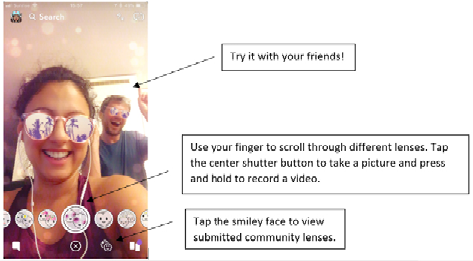
Figure 3.3
Basic Snapchat lens layout
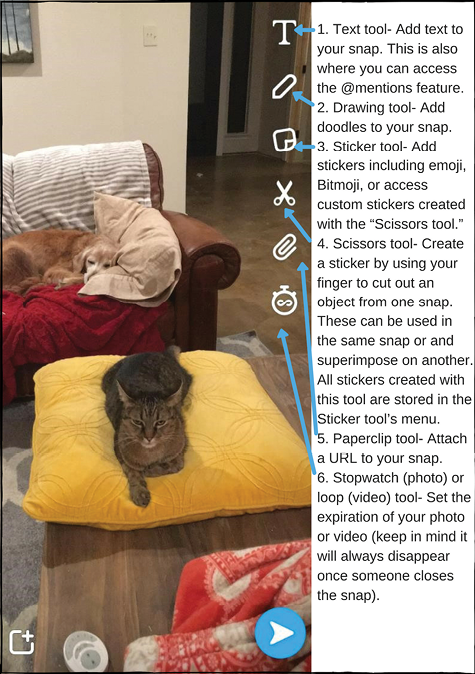
Figure 3.4
Snapchat Creative Tools menu
Figures 3.5 & 3.6
Examples of text with and without a background

Figure 3.7
Book face swap example by Severn School’s Zimmerman Library (Source: Severn Library, “Book Face Swap Winner!” Book, Line, and Sinker [blog], May 3, 2016, https://severnlibrary.wordpress.com/2016/05/03/book-face-swap-winner.)

Figure 3.8
Event-specific geofilters from @NCSULibraries

Figure 3.9
Example of a custom sticker superimposed on a photo


Figures 3.10 and 3.11
Example of a two-snap joke (Source: Lindsay Kolowich, “14 of the Best Snapchat Accounts to Follow for Inspiration,” Hubspot, March 22, 2017, https://blog.hubspot.com/marketing/snapchat-best-brands.)

Figure 3.12
Example of a snap with a CTA by Johnston Public Library’s JPL Teen Advisory Board
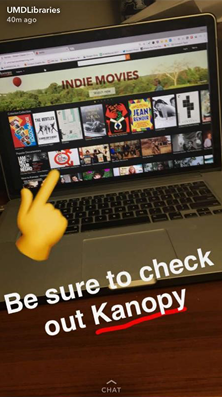

Figures 3.13 & 3.14
Example of an introductory snap followed by an explanatory snap by the University of Maryland Libraries