Chapter 4. Instagram in the Library
Instagram is a marketing force to be reckoned with. With brands now having the ability to generate revenue via advertising and shopping posts and a growing base of users, it is currently the it platform for reaching the coveted Gen Z and millennial demographics. However, as what happened with Facebook, when everyone’s mom, dad, and grandparent join the platform, teens and young adults might once again migrate to the next hip (and probably frustratingly obfuscatory) channel. Despite this, the #hashtags, location pins, @mentioning, and a combination of permanence and ephemerality all create a desirable package that keeps users coming back for more and brands close on their heels trying to grab and keep their attention. Somewhere in the middle of that mix are libraries. Not seeking to make a profit, libraries are in the unique position to use social media for the social good, freely spreading knowledge to those in their communities. Recently with Instagram, they are able to expand outside of their brick-and-mortar locations and reach younger patrons who might not know about certain information sources otherwise.
In this chapter, I will be presenting some tips library professionals can utilize to increase the effectiveness of their Instagram presences. This chapter builds on ideas presented in chapters 1 and 2, including the conversations I conducted with select library social media experts in the United States and abroad (see chapter 1). As with the previous chapter on Snapchat, this chapter will focus more on content tactics and strategies rather than being an Instagram “how-to.” Before I dive into the wonders of Instagram, I wanted to outline some terms that I will be using:
- Instagram = IG: I use Instagram and IG interchangeably
- @mentions, @tagging, @handle, @usernames: the @ symbol refers to linkable profile names. I also use @mentions and @tagging interchangeably.
- IG Stories refers to any content posted on an Instagram Story.
- IG Feed Posts describes permanent posts on someone’s Instagram feed.
In-App Instagram Tools and Features
To keep users hooked, Instagram is always adding to its in-app offerings. 2018 saw the debut of Nametag, third-party direct publishing, video chatting via IG direct, and topic channels. The following lists some staple in-app features that you should definitely try out:
- Carousel photos—IG carousel posts comprise a swipeable collection of up to ten photos or videos.1 Previously I used the grid app Layout for collage photos,2 but recently noticed a better engagement return with the multi-photo carousel pictures. This chronological feature is a fun and compact way to break up content, making it particularly amenable for book talks, tutorials (with each picture or video explaining the next step), or event highlights.3 I recommend limiting these to around three to five photos so as not to overburden your viewer. The New York Public Library (@nypl) does an excellent job, striking the perfect carousel balance that makes you want to swipe the entire way through.
@nypl
- Filters—Filters are IG’s bread and butter. They let you employ Photoshop-style effects to your content. While I would not recommend using this all the time, @acclibraries had the valuable idea of cultivating a cohesive aesthetic by touching up the lighting with filters such as Crema to make content look light and bright.
- Nametag—One of Instagram’s newer additions, Nametag works similarly to Snapchat’s Snapcodes, allowing users to easily find and follow others by scanning the customized image.4 This can be particularly useful for print materials such as promotional posters, bookmarks, and so on, or, to take a page from @orillia_library (see Account Promotion in chapter 1), AirDropping it to individuals during a conference, school visit, workshop, or class session.
- Insights—IG Insights are available only via the mobile app for business accounts or accounts with high levels of engagement. If you have not switched to a business profile yet, Instagram has a great tutorial you can follow.5 (I’d also recommend that you do this for your Facebook page.) IG Insights provide a variety of useful information, including audience demographics, account-level metrics such as profile visits and website clicks, and granular post-level data such as peak user activity (so you know when your audience is most active), engagement, impressions, and reach (see the section Analytics below). Take a look at Victoria Wright’s post on Social Media Examiner if you need to get up to speed on IG Insights navigation.6
- About reposting—I’m a fan of reposting, but Instagram has made a concerted effort to tamp this down. As you’ve probably noticed, you cannot share or repost directly from someone’s feed in the app. While some third-party apps (such as Repost) allow you to do this, reposting without the user’s permission is against Instagram’s terms of service and is illegal. That doesn’t mean you should give up on IG user-generated content. You just have to take a few extra steps, namely first asking for permission and then giving proper attribution. Additionally, users can repost IG feed content on their IG Story as well as repost Story content on their Story if they have been @tagged (see figure 4.1). Try using this to share user-generated content via Stories as well as to update your Instagram Stories Highlights album (see Stories Highlights in the Bio section of this chapter).7
Stories, Camera Effects, and Features
Taking a page out of Snapchat’s book, Instagram now offers a wide range of fun effects that you can add to your content. To access these options, tap the camera icon  in the upper-left corner of the mobile app, and right or left swipe through the selections below the shutter button. The camera effects are tailored toward IG Stories sharing, but content can also be saved to your phone’s camera roll and uploaded to your Instagram feed. To use the regular IG camera for feed posts, tap the plus icon
  from the menu at the bottom of the screen.
- Superzoom—The Superzoom effect activates a three-second zoom in on the object of your choice, with a submenu to add sound, animation, or both. You can really have fun with these by using them to add high drama, intensity, humor, and/or even a little steam (see figure 4.2).
- Boomerang—Boomerang has been around for a while as a separate app (iOS or Android) and was integrated into the Instagram camera in 2016.8 This looping mechanism lets you create GIF-style mini-videos. Booms are best when the subject is making a rapid movement (like flailing their appendages, turning their head, or flipping book pages). iMore has a great article by Cella Lao Rousseau on shooting the perfect Boomerang, which includes suggestions such as layering content (having a few people do different movements in the photo to make it more interesting) and turning the camera on yourself to create a selfie boom.9
- Type—Type mode lets you insert a text-only image. Instagrammers normally use this to share a thought or inspirational quote. In the section IG and Snapchat Stories Tips in chapter 2, I relay Hootsuite’s recommendation that when creating a longer story, you should break it up into chapters (perfect for dividing up and organizing a book talk or tutorial!).10
- Live—With Instagram Live you can livestream a video, during which users can comment in real time on what’s happening. To execute properly, IG Live videos take thorough planning but can be an exciting addition. Try experimenting with it for your upcoming library workshop, tutorial, or author Q&A session. I really enjoy the use of the Live feature by contributing National Geographic photographer Paul Nicklen (@paulnicklen).
Paul Nicklen on Instagram
https://www.instagram.com/paulnicklen
- Music—Facebook, and by association Instagram, teamed up with Spotify to facilitate song integration. From Spotify, users can easily share a song to their Story rather than taking a screenshot. Ideas for working this into your strategy could include recommending study or focus songs, playlists, or albums for patrons who are easily distracted; featuring local musicians; sharing a fun fact about a tune, artist, or band; or recommending a book to go along with a specific genre, artist, or band. You can additionally link your Spotify account to Instagram and record a video with a song, similar to a movie with a soundtrack.
- Rewind—The Rewind feature plays your videos in reverse. Abby Norman on Romper has some fun ideas, such as “dropping a microphone and watching it fly up into your hand” and “capturing a fountain in motion and sharing a rewind of the water floating back up.”11 Test it out at your next library workshop or makerspace activity and see what unfolds (or contracts)!
- Hands-Free—As the name indicates, Hands-Free allows you to record a video without having to hold your phone. If you have a convenient place to prop up your camera, you could use it to record a book talk. However, videos are limited to a minute long with this feature.
- Stickers—Location, @mention, #hashtags, music, polls, questions, sentiment slider scales, dates, GIFs, and emoji all come in the form of stickers on Instagram Stories. With this feature, you can inject a little humor, ask a fun question, and optimize your post’s reach all in the same Story. Shopify has a helpful post if you want to learn more about IG stickers.12
Optimization
To reach as many individuals as possible takes a little search engine optimization (SEO) effort on your end. Before I go into specifics, you should do three things to make sure your account is positioned properly. Firstly, set up or migrate your account to a business profile.13 This gives you access to IG Insights and certain components available only to businesses. Secondly, to increase discoverability, use the same @handle across all your social media accounts if possible. And lastly, link your library’s Facebook and Instagram accounts to streamline management and help boost exposure.14
Bio
Your IG bio is the place where users can find ways to contact you, learn more about you, and see IG-specific metrics, including how many followers you have, people you follow, and posts you have published. A properly constructed bio can help generate more followers and drive those users to your website. Listed below are some key components that you might want to consider:
- Engaging profile picture—IG profile pictures are small at 110 by 110 pixels on the mobile app. Therefore, you want to ensure that the photo you utilize can be easily viewable at that size and not too intricate, busy, or pixelated. Many libraries utilize their logo as their profile image. If you decide to go this route, make sure it is designed at the accurate pixel specifications, as directly uploading your current logo might result in cut-off lettering or oblong orientation. Canva’s custom dimensions feature can help with this design task. I particularly like the profile pictures of @topekalibrary, @bklynlibrary, @nypl, @britishlibrary, and @labnf. If you have the time, you can change your profile image according to a season or campaign.
Canva
- Entire library name—Rather than using your IG @username, spell out the entire library name in the “name” section of your bio. This helps boost your discoverability on the platform, as users often will search for your library by name rather than @username.
- Mission statement/short blurb—This is a brief description of what your library is all about. I prefer it when brands veer away from “This is the official account of [brand name]” and make it their own, such as @penguinteen’s pithy statement “We are what you read,” or @cambridgeuniversitypress’s clever description, “Publishing since 1564—Posting pics since 2015.”15 @littlebrown and @epicreads do a great job of inserting fun and informative emoji in this section. Some brands like to include a short call to action (CTA), such as @adobe’s “Share your imaginative work using #Adobe_DreamBig.”16 You can also modify your description for any campaigns that you want to focus on like @reuters, whose bio in October read: “Our in-depth look at lithium and water worries in Chile’s Atacama desert: [link to article].”17
- Library’s main hashtag—In 2018, Instagram introduced #hashtag and @profile links for the bio section. This is where successful brands insert a short and memorable hashtag that they want users to follow and use when they are posting.18 You can incorporate this either as a part of speech (e.g. “Sharing photos of #Harvard on campus and around the world”), explain how to use it (“To have your photo featured, tag it with #myethzurich”), or list it at the end of profile description.19 I found it surprisingly hard to find libraries that have incorporated this feature but did find useful examples in the university space; take a look at @harvard, @uofmichigan, and @ucla.
- @Affiliate branches or organizations—You can drive users to your library’s, partner’s, or branch’s Instagram accounts by mentioning their @handle. @penguinbooks (“portable paperback joy from @vikingbooks and @penguinpress”) and @vodkafordogpeople (“We are @titosvodka & #VodkaForDogPeople! We
 and work with @emancipet to help create a world with fewer and fewer homeless pets.”) utilize this feature well.20
 - Trackable URL to your homepage/catalog—A trackable URL will allow you to monitor the effectiveness of your Instagram presence (see the discussion of Google Analytics in the section General Management Ideas, Tools, and Resources in chapter 2). Additionally, Patel recommends that you include a URL that links to a mobile-optimized website as Instagram is a mobile-heavy platform.21
- CTA buttons—How do you want patrons to reach you? With an IG business account, you can include various action buttons such as call, text, directions, email, book, buy tickets, and reserve. The first four actions are automatically added after you input your library’s email, phone number, and physical address in your profile. (This is done by selecting Edit Profile → Contact Options → Address, Phone, etc.; the others change periodically and can be added by tapping Edit Profile → Contact Options → Add an action button.)
- Category—Adding a category to your profile helps users find you on Instagram and could aid in your exposure on IG’s Explore homepage. Conveniently, a library option is available!
- Stories Highlights—Stories Highlights are a way to pin and save your best IG Stories content based on a specific theme. I recommend highlighting only posts that your readers will want to see more than once. For example, many events tend to be one-off occurrences, but some content such as “library staff picks” have a longer shelf life. In addition to saving content, you can also create a unified brand image by uploading your own covers (see figure 4.3). Some topic areas could include book talks, readers’ advisory, author visits, and tutorials. @harpercollinsus, @Amazon, @BarnesAndNoble, and @audible_com have crafted some muse-worthy content if you need ideas.
- Noteworthy example—@nypl came up with the brilliant idea of #InstaNovels. This is a collaborative effort between @nypl and designer @magoz involving a digital bookshelf in which users can read a story directly from their IG Stories/Highlights.22
Post Optimization
Both IG feed and Stories posts now support @mentions, #hashtags, and location tags. Your Stories posts may or may not need these features (which are added from the stickers menu on Instagram), but most feed posts can be significantly enhanced with this type of linked metadata. @mentions let you tag other Instagrammers who are connected to your post. This is a great way to increase your reach, encourage other organizations or departments that you work with to share your content, and interact with your current patrons (if @tagging individuals is in your social media policy). To streamline this process, I keep a running list in an Excel sheet of the usernames of all the departments, partner schools, and so on that I might want to @mention. When featuring students in their posts, @acclibraries makes a point of incorporating their @handles with students’ permission. @acclibraries states that not only do students find it fun, sometimes directly asking to be @tagged in the post, but also it is a great way to increase engagement. They also revealed that @mentioning authors or publishers of a book that they are featuring has been successful. This is a very smart way to encourage reposting by an author or influencer, which could handily boost your followership and engagement numbers.
Geotags or location tags can also help increase the exposure of your posts and seem to be preferred by the IG algorithm. @acclibraries noticed geotagged posts performing better on Stories, prompting them to increase their usage of this feature, incorporating location stickers for the library location or expanding the radius to include the college, surrounding city, and so on. @librariesluc reported a similar implementation with IG feed posts, geotagging the library location or university location as well as city hashtags such as #Chicago or #LoyolaChicago.
Speaking of hashtags, these little bits of backend code can yield big benefits regarding engagement. Unlike Snapchat, Instagram supports hashtags, and they are ingrained in the IG ecosystem. With these metadata descriptors, you easily categorize content to enhance discoverability. This is made even more useful as Instagram added hashtag following to users. With this feature, users can see hashtagged content that they are following (e.g., #LibrariesOfInstagram, #BookFaceFriday, etc.) in their feed, just as they would see content from the people they follow. One best practice in this arena is to include your most relevant hashtags as part of the main text and then bury additional SEO-type hashtags below the text using periods or emoji such as books (see figure 4.4). Instagram blogger Louise Myers suggests using your phone’s Notes app to create and save sets of hashtags that you use often.23 If you need tips on choosing or targeting your hashtags, the Focalmark app is an excellent resource.24 Hootsuite has a great guide on how to properly incorporate hashtags as well. 25
In addition to post #hashtags, Instagram now supports #hashtags in the bio section, which provides brands with a prime opportunity to promote an official #hashtag. This could be campaign-specific (like @macmillanusa’s #Macmillian175), an ongoing #hashtag that reflects your goals or mission (like @papyrus’s #LovePapyrus or @lexususa’s #LookAtMyLexus), or a #hashtagged version of your @username (like @librarystreetcollective’s #librarystreetcollective). Placing this information in the bio section instructs your audience on the official way to tag their posts when they are in the library. You could even include a CTA like @REI’s “Share your adventures with #OptOutside.”26 You can enhance the readability of your hashtags by using CamelCase, where the first letter of each word is capitalized.
Content Tips and Ideas
This section presents content ideas and tools that are successful specifically on Instagram. (General topic suggestions and a comprehensive list of tools are available in chapters 1 and 2.) Because Instagram is a place for higher quality imagery and Snapchat a space tailored more toward comical and unfiltered content, I recommend that you tweak your strategy accordingly. However, there is definitely some crossover, and probably the most important thing to keep in mind is to make it your own. For direct promotional content such as an event announcement or specific book that you suggest patrons check out, it is a good idea to use a shortened URL (Bitly is useful). Because Instagram does not currently support linked URLs in individual posts, an easy-to-type URL can maximize conversions in this area. (If you happen to have 10,000+ followers, you can link your Instagram Story posts.27)
Bitly
- Unfold (www.unfoldstori.es)—This app gives your content a minimalist aesthetic vibe and is also useful for formatting posts for IG Stories. Price: free.
- Vintage: Logo Maker and Creator (https://itunes.apple.com/us/app/vintage-logo-maker-creator/id878042995?mt=8)—A handy app for customizing Instagram photos. Available only on iOS. Price: $2.99.
- Book sculptures and book beauty shots—High-quality, artistic book photos are at home on Instagram. Bookstagrammer @james_trevino is especially skilled at the art of impressively imaginative assemblage if you are looking for inspiration.28 But you don’t need to be as ambitious as influencer bookstagrammers to draw in users. Constructing an assortment of your top tomes with a fun background or according to color can do the trick. These can be especially apropos during various seasons and holidays (see figure 4.5). Jones recommends thinking about the “theme, setting, or characters in a book and creating a mini-tableau for a photo shoot” when promoting different books on Instagram.29
- Contests and prizes—Who doesn’t want to win a free book? The chance to win something is always a sure bet to get users to pay attention. Use pictures with people, books, or both with an informative caption over images of flyers or PDF screenshots. @NISDStevensLib stated that they have had success with monthly book giveaways for parents and teachers at their school.
- Pictures of book text—Highlight a fun book passage or inspiring poem with a picture of the text. @nypl has done a great job featuring some intriguing public domain historical gems that are often hilarious or beautifully nostalgic. If you are posting a particularly periphrastic passage in an IG Story, post the same image twice, so everyone has time to read it. You can also use the doodle feature to underline poignant passages.
- Progression posts—Instagram Stories’ opinion and questions stickers seem like they were custom-made for libraries. When asking something on IG Stories, use a progression or “stay tuned” style, posting a question followed by some of the answers (see figures 4.6 and 4.7). @acclibraries likes to use the poll feature on IG Stories for a recurring “question of the week” content. @TorontoLibrary has posed some engaging questions and anticipatory posts on IG Stories, which are currently highlighted on their #TPLLoves board.30
- Shelfies and Bookfaces—Library blogger Gwyneth Jones explains that “shelfies” involve taking a picture of patrons holding up a book that they just checked out or are turning in.31 On Instagram, the #shelfie hashtag involves a diverse set of content, including a plethora of aesthetically pleasing book color assortments, well-organized kitchen or bathroom shelves, and rustic seasonally themed book displays. You can use this approach in whatever way you want, making it a little more curated and polished or patron-focused and authentic. #BookFace and #BookFaceFriday are another easy way to get patrons to interact with the physical library space and create some awesome user-generated content. Encourage your patrons to @tag you in their #BookFaceFriday posts and have them get creative! I have seen some really impressive posts by following #BookFaceFriday and recommend that you take some time to scroll through what is currently out there.
- Instagram takeovers—Social media “takeovers” are traditionally done by a social media influencer or celebrity, and give these individuals access to post on a brand’s account for a select amount of time (normally a day). @harpercollinsus does this well with authors who have upcoming book releases (see figure 4.8). While limited library budgets might not make something of that scale very accessible, your library could test this out with select students or patrons, library staff from different departments or branches, or teachers at your school. @escpeeuropelibrary did a fun takeover with various staff in their library.32 Forbes recently released a helpful article on how to execute an effective takeover, and Buffer also published a useful guide if you are interested in launching one.33
Aspirational @ccounts and Hashtags to Follow or Utilize
Following outstanding accounts on Instagram can be extremely helpful for idea generation and community participation. This does not have to be solely library-focused. For example, @topekalibrary stated that they follow various photographers and influencers and translate different ideas to a library context. Listed below are a few @ccounts and hashtags you can follow for endless “instapiration.”
- #AmReading, https://www.instagram.com/explore/tags/amreading
- @bodlianlibs, https://www.instagram.com/bodleianlibs/?hl=en
- #BookFaceFriday, https://www.instagram.com/explore/tags/bookfacefriday
- #BooksBooksBooks, https://www.instagram.com/explore/tags/booksbooksbooks
- @BookRiot, https://www.instagram.com/bookriot
- #Bookstagram Sharanya Sharma, “The Joys of Bookstagram Challenges,” Book Riot, June 14, 2016, https://bookriot.com/2016/06/14/joys-bookstagram-challenges
- #Bookstagrammer, https://www.instagram.com/explore/tags/bookstagrammer
- @james_trevino, https://www.instagram.com/james_trevino (recommended by @CMCLibrary)
- @jaybaer, https://www.instagram.com/jaybaer (recommended by @topekalibrary)
- @jenns_trends, https://www.instagram.com/jenns_trends (recommended by @topekalibrary)
- #IGreads, https://www.instagram.com/explore/tags/igreads
- #InstaNovel, https://www.instagram.com/explore/tags/instanovel (created by @nypl for their Insta Novels campaign; see Stories Highlights in the section Stories Camera Effects and Features in this chapter)
- #LibraryLife, https://www.instagram.com/explore/tags/librarylife (Hashtags like this help you tap into the ways people like to engage with the library or what digital humanities researcher Kathryn Eccles calls “moments of meaning making.”34 Understanding user behavior is an effective way to build your future content strategy. For example, if you see a lot of patrons gravitating toward a particular statue, create a cheeky Instagram post with said sculpture. Some museums are very skilled at maximizing the potential of these user behaviors.)
- #LibrariesOfInstagram, https://www.instagram.com/explore/tags/librariesofinstagram
- @princetonpl, https://www.instagram.com/princetonpl (Princeton Public Library, recommended by @CMCLibrary)
- #Shelfie, https://www.instagram.com/explore/tags/shelfie
- @nypl, https://www.instagram.com/nypl (Forbes put out a great article entitled “What Brands Can Learn from the New York Public Library’s Instagram Stories” that you should definitely check out.35)
Analytics
This section introduces a few methods and insights for analyzing Instagram data. However, if you want a more thorough look at platform logistics, the Instagram Help Center is a great resource.36 You can currently look at three areas of data: Activity (day-to-day activity for the last week), content (metrics on individual feed posts, IG Stories content, and promotional material), and Audience (demographic information of your current followers). As this content is inconveniently viewable only from a mobile device and expires after a certain amount of time, it is a good idea to record everything with Excel or Google Sheets.
Post-level metrics (found in the content menu) provide some valuable information about the performance of your content. This data goes back as far as two years for feed posts and two weeks for IG Stories and includes common metrics such as engagement, follows, impressions, likes, and reach. You can also look at post type by using the menu to drill down to photo, video, or carousel post metrics. If you are an Instagram manager, look at IG Insights at least monthly to get an understanding of what played well for that month and qualitatively explore the reasons why that content was successful (e.g., Should we do more content on this topic? What hashtags did we use? What time of year was it posted?). For example, @CMCLibrary perceptively noticed a spike in their social media traffic during the summer and figured out that this was most likely due to vacationers visiting the Cape May area. By looking at that seasonal change, they are now able to plan the type of content they want to send out during that time because there are eyes on their content.
Higher-level reporting on a quarterly or semesterly basis is helpful even if it is just for the benefit of you and your team, as it gives you a chance to see what performed well, plan future content or campaigns ahead of time, and have data ready for higher-level library administrators who might be interested. Listed below are a few areas that you might want to look at when you are pulling your reports together:
- Growth—Has your audience, engagement, and so on grown since last year, quarter, semester, or season? By how much? It is helpful to analyze the same season or quarters rather than the previous time unit as the comparison is more accurate. So, rather than comparing spring engagement to summer engagement, look at summer 2017 engagement against summer 2018 engagement.
- Weighted engagement—For metrics such as likes, video views, impressions, and reach, I take the total number and divide it by the number of posts sent during the time of interest. This lets you reduce some noise and get a clearer picture. For example, if you have a higher volume of posts sent in one quarter versus another, you most likely have higher total engagement, but this doesn’t necessarily indicate the content was more engaging. You just have more data. Before weighting data, remove any outliers, as they will skew the results; a common rule of thumb is above or below three standard deviations from the mean.
- Drop-offs—Drop-off rates can be helpful when looking at video and IG Stories views. Divide the difference by the views of the first video time segment or story post and multiply by 100.37 This will give you the drop-off rate as a percentage.
- Interaction—Track how many messages and comments you received on Instagram. You could even look at interaction type, such as reference question, directional question, general compliment, and so on.
- Conversions—If you use trackable links that work with your library’s website, you can monitor things like website visits, book checkouts or holds, and event attendance (see the discussion of Google Analytics in the section General Management Ideas, Tools, and Resources in chapter 2). Since Instagram restricts clickable links to the bio section, it is best to create shortened URLs for your individual posts and a campaign-specific URL for the bio section.
Hungry for more data exploration methods? Hubspot and Social Media Examiner have some useful online guides!38
Conclusion
So that is Instagram in the Library in a nutshell. When creating content, just remember to have fun with it and not take yourself too seriously. Both Instagram and Snapchat are places where you can be a bit riskier and experiment with new ways to reach your library patrons. Just remember, keep it fresh, and you can’t really ever go wrong with a cute animal pic. Hopefully, the future holds more collaborative arenas in which library professionals can share ideas with each other. So many amazing ideas are getting cooked up in these spaces, and it would be wonderful if we could discuss them more systematically. I’m excited to see what content libraries will create next!
Acknowledgements
I would like to thank the 11 library professionals who let me interview them. It was a joy to chat about the innovative ways you all are communicating with your communities. Thank you again for both participating and reading all the drafts that I sent your way!
I would also like to recognize Molly Shunney. Your ideas, edits, and feedback were invaluable! You are such a great support and have a gift for delivering both instructive and bolstering recommendations.
And finally, thank you to the American Library Association for the opportunity to contribute to the Library Technology Reports series, and specifically to Samantha Imburgia for your helpful edits.
Notes
- Josh Constine, “Instagram Lets You Post up to 10 Photos or Videos as 1 Swipeable Carousel,” TechCrunch (blog), February 22, 2017, http://social.techcrunch.com/2017/02/22/instagram-carousels.
- “Layout from Instagram,” Instagram, App Store, accessed October 23, 2018, https://itunes.apple.com/us/app/layout-from-instagram/id967351793?mt=8.
- “6 Creative Ideas for Using Instagram’s Carousel Feature,” DBS Interactive (blog), March 14, 2017, https://www.dbswebsite.com/blog/2017/03/14/creative-ideas-instagram-carousel-feature.
- Benjamin Chacon, “Instagram Launches New Nametag Feature,” Later Blog, October 5, 2018, https://later.com/blog/instagram-nametag-feature.
- “How Do I Set Up a Business Profile on Instagram?” Instagram Help Center, accessed October 22, 2018, https://help.instagram.com/502981923235522?helpref=faq_content.
- Victoria Wright, “4 Ways to Use Instagram Insights to Improve Your Marketing,” Social Media Examiner, February 21, 2018, https://www.socialmediaexaminer.com/4-ways-to-use-instagram-insights-to-improve-marketing.
- Benjamin Chacon, “New Instagram Feature: You Can Now Repost Instagram Stories,” Later Blog, April 25, 2018, https://later.com/blog/repost-instagram-stories.
- “Boomerang from Instagram,” Instagram, App Store, accessed October 19, 2018, https://itunes.apple.com/us/app/boomerang-from-instagram/id1041596399?mt=8; “Boomerang from Instagram,” Instagram, Google Play, accessed October 19, 2018, https://play.google.com/store/apps/details?id=com.instagram.boomerang&hl=en_US.
- Cella Lao Rousseau “Tips for Shooting the Perfect Boomerang,” iMore, August 24, 2017, https://www.imore.com/tips-shooting-perfect-boomerang.
- Amy Elderkin, “A Guide to Crafting the Perfect Snapchat Story: 12 Tips for Success,” Social (blog), Hootsuite, August 23, 2016, https://blog.hootsuite.com/guide-perfect-snapchat-story.
- Abby Norman, “How To Use Rewind Mode on Instagram,” Romper, May 16, 2017, https://www.romper.com/p/how-to-use-rewind-mode-on-instagram-stories-58136.
- Anna Gotter, “Instagram Stickers: The Underrated Feature That Can Take Your Stories Further,” Ecommerce, Shopify Blogs, September 26, 2018, https://www.shopify.com/blog/instagram-stickers.
- Instagram Business Team, “Creating a Business Profile on Instagram,” Business Blog, Instagram, July 22, 2016, https://business.instagram.com/blog/creating-a-business-profile-on-instagram.
- “How Do I Link My Instagram Account to a Facebook Page That I Manage?” Instagram Help Center, accessed October 22, 2018, https://help.instagram.com/356902681064399.
- Penguin Teen (@penguinteen), Instagram page, accessed October 22, 2018, https://www.instagram.com/penguinteen; Cambridge University Press (@cambridgeuniversitypress), Instagram page, accessed October 22, 2018, https://www.instagram.com/cambridgeuniversitypress.
- Adobe (@adobe), Instagram page, accessed October 22, 2018, https://www.instagram.com/adobe.
- Reuters (@reuters), Instagram page, accessed October 22, 2018, https://www.instagram.com/reuters.
- “How Do I Follow a Hashtag?” Instagram Help Center, accessed October 22, 2018, https://help.instagram.com/2003408499915301.
- Harvard University (@harvard), Instagram page, accessed December 11, 2018, https://www.instagram.com/harvard/?hl=en; ETH Zurich (@ethzurich), Instagram page, accessed December 11, 2018, https://www.instagram.com/ethzurich/?hl=en.
- 20. Penguin Books (@penguinbooks), Instagram page, accessed October 25, 2018, https://www.instagram.com/penguinbooks; Vodka for Dog People (@vodkafordogpeople), Instagram page, accessed October 25, 2018, https://www.instagram.com/vodkafordogpeople.
- Deep Patel, “15 Ways to Optimize Your Instagram Profile,” Entrepreneur, February 28, 2018, https://www.entrepreneur.com/article/309671.
- NYPL Staff, “Insta Novels: Bringing Classic Literature to Instagram Stories,” New York Public Library (blog), accessed October 25, 2018, https://www.nypl.org/blog/2018/08/22/instanovels.
- Louise Myers, “How to Use Hashtags on Instagram for Explosive Growth,” Louise Myers Visual Social Media, May 16, 2018, https://louisem.com/7198/how-to-use-hashtags-on-instagram.
- Focalmark website, accessed October 23, 2018, http://focalmark.com.
- Michael Aynsley, “The 2018 Instagram Hashtag Guide—How to Use Them and Get Results,” Social (blog), Hootsuite, July 4, 2018, https://blog.hootsuite.com/instagram-hashtags.
- REI (@rei), Instagram page, accessed October 26, 2018, https://www.instagram.com/rei.
- Caroline Forsey, “Here’s How to Add a Link to Your Instagram Story [Pro Tip],” Marketing (blog), HubSpot, September 7, 2018, https://blog.hubspot.com/marketing/add-link-instagram-story.
- James Trevino (@james_trevino), Instagram page, accessed October 23, 2018, https://www.instagram.com/james_trevino.
- Gwyneth Jones, “12 Insta Easy Instagram Library & Literacy Promotion Ideas,” YALSA Blog, February 23, 2017, http://yalsa.ala.org/blog/2017/02/23/12-insta-easy-instagram-library-literacy-promotion-ideas.
- Toronto Public Library (@torontolibrary), Instagram page, accessed October 24, 2018, https://www.instagram.com/torontolibrary; Toronto Public Library’s #TPLLoves board, https://www.instagram.com/stories/highlights/17911339186005125/?hl=en.
- Jones, “12 Insta Easy.”
- ESCP Europe Library (@escpeuropelibrary), Instagram page, accessed October 24, 2018, https://www.instagram.com/escpeuropelibrary.
- Alfred Lua, “Instagram Takeover: How to Host a Takeover in 6 Easy Steps,” Social Blog, Buffer, February 14, 2017, https://blog.bufferapp.com/instagram-takeover; Kate Talbot, “5 Tips for an Effective Instagram Story Takeover,” Forbes, March 19, 2018, https://www.forbes.com/sites/katetalbot/2018/03/19/5-tips-for-an-effective-instagram-story-takeover.
- Kathryn Eccles, “Culture is (Now) Digital: Understanding Public Engagement with Cultural Heritage Using New Tools” (lecture, Oxford Internet Institute’s 2018 summer doctoral program, Oxford, UK, July 4, 2018).
- Kate Talbot, “What Brands Can Learn from the New York Public Library’s Instagram Stories,” Forbes, October 10, 2018, https://www.forbes.com/sites/katetalbot/2018/10/10/what-brands-can-learn-from-the-new-york-public-librarys-instagram-stories.
- “How Do I View Insights on Instagram?” Instagram Help Center, accessed October 25, 2018, https://help.instagram.com/1533933820244654?helpref=uf_permalink.
- Tony Tran, “Snapchat Insights: How to Use the Analytics Tool (and What to Track),” Social (blog), Hootsuite, October 23, 2018, https://blog.hootsuite.com/snapchat-analytics.
- Amanda Zantal-Wiener, “How to Use Instagram Insights,” Marketing (blog), HubSpot, January 26, 2018, https://blog.hubspot.com/marketing/how-to-use-instagram-insights; Wright, “4 Ways to Use Instagram Insights.”
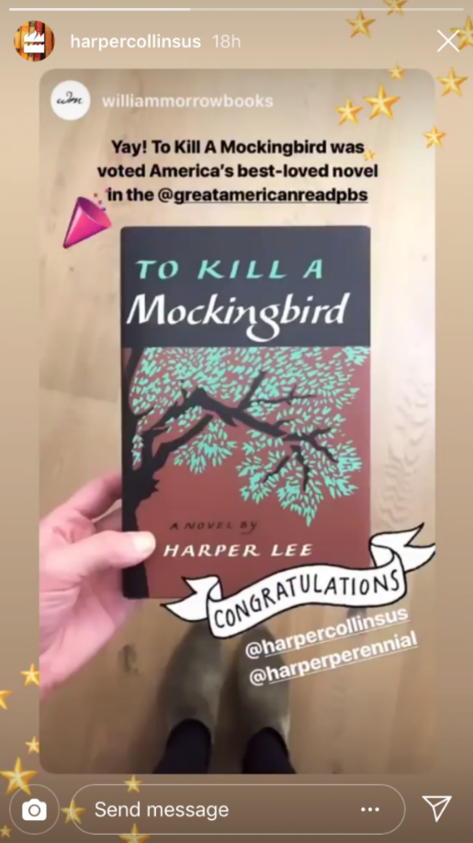
Figure 4.1
Example of an @tagged repost by @harpercollinsus. (This is also a nice example of IG sticker usage; see stickers in the section Stories Camera Effects and Features of this chapter.)
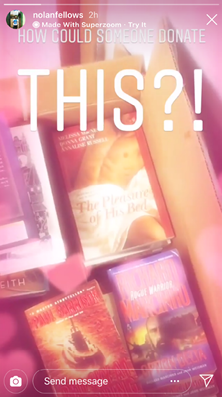
Figure 4.2
Example of Superzoom with the “hearts” animation by IG user @nolanfellows
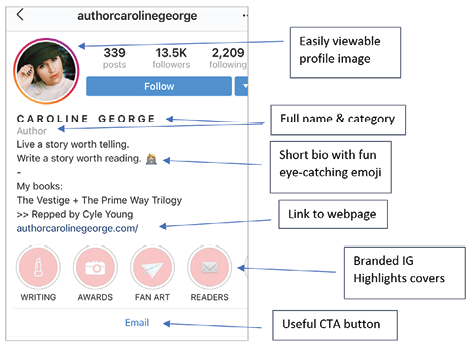
Figure 4.3
Example of an optimized IG bio, replete with branded Stories Highlights covers (Source: Caroline George, [@authorcarolinegeorge], Instagram page, accessed October 22, 2018, https://www.instagram.com/authorcarolinegeorge.)

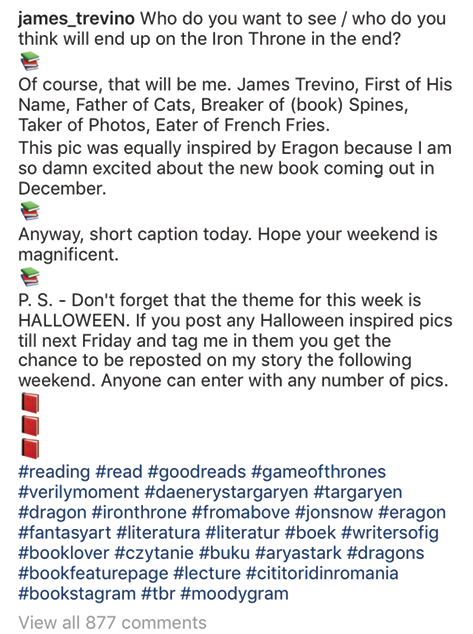
Figure 4.4
Example of buried hashtags using emoji by @james_trevino (Source: James Trevino, “Who do you want to see end up on the Iron Throne,” October 20, 2018, https://www.instagram.com/p/BpKVZ6pFfiz/.)

Figure 4.5
Winter book sculptures by @acclibraries (Source: Austin Community College Libraries, “#booksculpture,” December 20, 2017, https://www.instagram.com/p/Bc8k_v4gEO4/.)
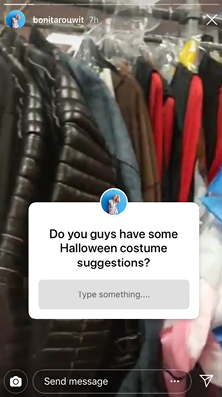
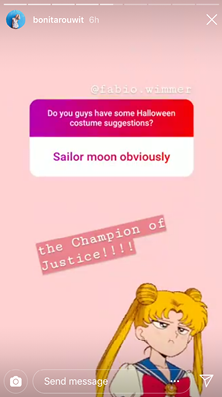
Figures 4.6 and 4.7
Example of a progression post by @bonitarouwit

Figure 4.8
Instagram takeover for @harpercollinsus featuring Find Me Gone author @sarahmeuleman (Source: HarperCollins U.S., “Author Sarah Meuleman Instagram takeover,” October 23, 2018, https://www.instagram.com/p/BpRsiVnCko0/.)