Chapter 3. Transcripts
Transcripts are an important element of the video accessibility landscape, even though they are not as commonly considered as captions. Often mistakenly seen as nothing more than an alternative to captions, transcripts can serve separate and equally important purposes for both accessibility and usability. In many cases, it makes sense to offer them as another access point rather than seeing them as merely an alternative to existing accessibility options. Transcripts serve as an excellent example of the way that providing multiple accessibility features also offers better, more versatile, and more flexible user experiences for everyone.
What Are Transcripts?
As with captions, transcripts represent in textual form the audible content included in videos and other multimedia content. In order to serve as a complete replacement for this audio content, transcripts generally include textual descriptions or representations of important sounds beyond speech. The primary distinction between transcripts and captions is how and where they are displayed.
Transcripts show many lines of text representing several seconds of audio, but cannot be overlaid on the video screen, as the text would obscure too much information. So they are shown in a separate window, next to or under the video screen, but this can also be hard to read as the text is further away from the video.1
Because transcripts are not directly connected to the video and can be used without viewing the video, they often include textual representations of important visual content from the video as well. This type of transcript is sometimes referred to as a descriptive transcript.
Transcripts can be presented completely separately from the video content, but in online environments, it is more common for them to appear to the side of or below the video player in a location that allows users to read them while viewing the video (figure 3.1). While transcripts can simply be a static presentation of text, an increasing number of online transcripts scroll in sync with the video content or allow users to navigate through video content by clicking on specific sections of the transcript, which adds greater interactivity for users. Transcripts that facilitate moving through the video can be particularly useful for long videos as they allow users to refer back to specific sections without viewing the entire video again.
The Role of Transcripts in Accessibility
Among video accessibility options, transcripts are frequently overlooked. Many see them as an inferior substitute for captions. It is true that transcripts are less effective for users who hope to read a textual narrative while simultaneously watching the video content. As noted above, the text is displayed separately from the video, which can be a less usable setup for most users. Though there are display options that can help to mitigate this issue, such as a display that features transcripts that scroll in sync with the video just to the side of the video content, it does mean that transcripts are rarely an optimal replacement for captions. Even when they are positioned carefully and scroll with the video, they are still generally not the preferred choice for many of the main audiences for captions, including D/deaf or hard-of-hearing users and those watching the video with the sound turned off.
However, this understanding of the utility of transcripts misses the important roles that transcripts play in video usability and accessibility. Of particular importance is the fact that transcripts are vital for deafblind or blind individuals who use braille displays. Because video captions are integrated into the video themselves, they cannot be read by braille displays in most, if not all, situations. This leaves these videos inaccessible to users who access content with this type of assistive technology. In particular, for users who are deafblind, transcripts may be their only option for accessing videos. This specific need is one that is still overlooked at a greater rate than other types of online video accessibility. Users who use braille displays are best served by offering transcripts in addition to, or even instead of, captions. To make the video content accessible to these users, transcripts must include information about the visual elements of the video as well, meaning that descriptive transcripts offer a significantly better and more equitable user experience for these users.
In addition, for deafblind users, it is not enough to simply offer transcripts, but those transcripts must be placed and carefully designed for maximum accessibility. Especially for those who are interested in developing interactive transcripts, such as those that scroll or are highlighted in sync with the associated video, accessible web design must be at the forefront if the transcripts are intended to provide access for users who use assistive tools. Too often captions are presented in a way that makes them inaccessible to assistive technologies, such as braille displays, which severely limits their utility.
While offering access to those who use braille displays is perhaps the most noteworthy function for transcripts, because braille displays may be the sole access point for those users, there are other accessibility advantages to offering transcripts in addition to captions. Users with certain types of learning disabilities may find that they prefer, and learn better from, reading the content as compared to watching a video. In particular, transcripts can be useful for those who may have difficulty processing auditory information or those who may find captions distracting or confusing while watching a video. Offering transcripts ensures that the needs of all of these users are addressed so that ultimately the informative content in the video is accessible and usable by a wider segment of the intended audience.
The Role of Transcripts in Usability
Some users may find that they simply prefer reading a transcript because they can read or scan it more quickly than they can watch a video. This is particularly helpful for users who are approaching video content for education or research purposes, as transcripts are fully searchable, allow for faster skimming when reviewing the information, and can most easily be added into notes by cutting and pasting direct quotations. In many cases, these use cases are independent reasons that transcripts are useful in educational settings. Even aside from their value for accessibility, transcripts are worthwhile because of the many ways that they can provide an improved user experience when they are offered in addition to captions on video content.
Transcripts can also be preferable for those with low bandwidth or unstable internet connections who struggle to load and watch video content online. They also work better for those users who simply don’t want to or cannot afford to pay for the data usage necessary to download a video, particularly in a mobile environment. None of these groups are well served by captions as they require that the user download or stream the video to access its content, which may not be technologically possible for them.
In addition, “creation of transcription for audio information allows audio data to be manipulated, archived, and retrieved more efficiently because text-based search is more expedient than audio-based search,”2 and caption files are often not available to these sorts of activities and the tools that facilitate them. As a result, transcripts are more versatile for other uses of the content, including analyzing text, running searches, and integrating content into other projects. Facilitating these uses can help to foster creative reuses of the video content and can ensure that it is available for unanticipated future needs. In addition, transcripts improve the search engine optimization for video content, making it more findable by potential users.
While this issue of Library Technology Reports is focused on the features and technologies needed to make video content accessible, it is worthwhile to note here that transcripts serve an important role in the accessibility of audio-only content as well. With the increasing popularity of online audio content generally, and podcasts specifically, transcripts are increasingly relevant for this purpose. It is important to note, though, that as with video content, unfortunately much of the audio content that is published frequently is not made accessible at the time of publication, with accessibility features added later as an afterthought. Transcripts for audio-only content make it accessible to users who are D/deaf or hard of hearing as well as improving search engine optimization, allowing users to search through the content. They also offer an option for those who prefer to read their information, just as in the case of videos. In fact, one study found that when This American Life added transcripts to its content, “the number of unique visitors who discovered TAL through organic search results increased by 6.68%.”3
Best Practices for Transcript Creation
Because the nature of transcripts means that they may be used separately from, or instead of, the video content rather than in tandem with it, transcripts must do more than simply reproduce the audio content of the video to be effective. In some ways, transcript creators should aim to accurately reflect both the audio elements and the key visual elements of the video. This is somewhat akin to combining the content of both captions and audio descriptions (discussed further in chapter 4). Some important best practices for creating high-quality transcripts are as follows:
- Ensure that all of the audio content is captured exactly as presented. All speech should be reproduced exactly as spoken. Unlike captions, there is less concern with transcripts if the content is lengthy because there is no need for it to fit on the screen in time with the audio. For this reason, transcripts should be as faithful as possible to the spoken content and should not be edited, abridged, or abbreviated unless absolutely necessary.
- The only time that audio content should be omitted is when it is inaudible. In these cases, there should be an indication that there is an inaudible sound. Such an indication could be used for characters who are whispering inaudibly or mumbling to themselves, for example.
- Spoken content should be presented as in the video, meaning that content should be censored only if it is also censored in the audio track of the video file.
- Indicate who the speaker is, when the speaker changes, and if the speaker is off screen to give context for those who are not viewing the video.
- Tone, emphasis, and other noteworthy features, such as volume, should be conveyed as appropriate, using punctuation or other consistently used characters. These features should be indicated with text only when it is impossible to otherwise indicate them.
- Indicate important sounds other than speech and their source.
- Specifically for music, indicate relevant information about the track, such as title and artist or even the full lyrics if this information is relevant in the context of the video.
- Indicate important visual information in the transcript by integrating it into the text. For example, describe what is happening on screen or the information silently presented on screen. This process should be similar to the process of deciding what information should be included in audio descriptions.
It is important to view transcripts as more than an alternative to captions. Though that is one role that they can play, there are many others as well. Rather than serving as a replacement for other accessibility features, they have their own benefits and expand the number of people for whom the content is usable. They can also make the content available for more types of uses both now and in the future.
As with so many aspects of accessibility, the importance of transcripts can be an example of the value in offering multiple options. Each user is different, whether or not they have a disability or use assistive technologies. They all have personal preferences and individualized technology setups, which may or may not involve assistive technologies. Because of these variations among users, offering flexibility and multiple access methods for the video content and the information it conveys is the best way to make this content widely accessible and usable. While this advice generally applies to the design and configuration of any presentation, it is particularly relevant in the case of video content, where the medium itself presents unique challenges for certain users. Wherever possible, the best approach is to integrate transcripts in addition to other access solutions to offer users options that will work best for their specific needs.
Notes
- Raja S. Kushalnagar, Walter S. Lasecki, and Jeffrey P. Bigham. “Captions versus Transcripts for Online Video Content,” in W4A ’13: Proceedings of the 10th International Cross-Disciplinary Conference on Web Accessibility (New York: Association for Computing Machinery, 2013), 1, http://www.cs.cmu.edu/~jbigham/pubs/pdfs/2014/captionvstranscripts.pdf.
- Keith Bain, Sara Basson, Alexander Faisman, and Dimitri Kanevsky, “Accessibility, Transcription, and Access Everywhere,” IBM Systems Journal 44, no. 3 (2005): 598.
- 3Play Media, “This American Life,” accessed October 24, 2020, https://www.3playmedia.com/why-3play/case-studies/this-american-life.
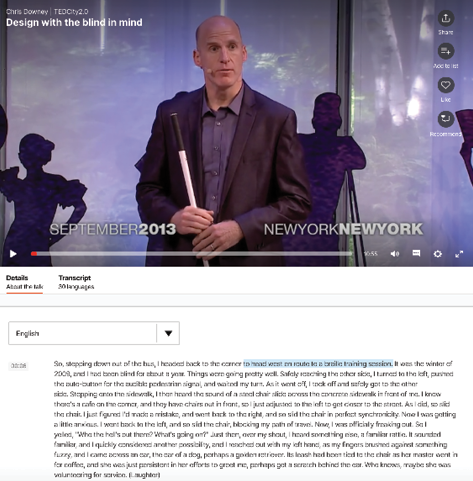
Figure 3.1
Example of an interactive transcript